


Yahoo Spam folder missing

Hi,
I access my Yahoo email account via IMAP in Thunderbird and am trying to configure it's Junk mail settings. Yahoo has it's spam going to a folder called "Spam" (which you can't change) but Thunderbird is not seeing this folder. I'd like it have the Thunderbird and Yahoo server junk/spam folder be the same one that way if their filters add something in there I can see it w/o having to go through the web interface. Unfortunately I can't get it working this way though.
Any ideas?
Thanks
Solução escolhida
Ok thanks. I wasn't sure if the "Bulk Mail" folder in TB was syncing with the "Spam" folder online so I wouldn't miss anything that ends up in there.
Todas as respostas (6)

You have to subscribe to IMAP folders that you want to view. File-Subscribe
Thanks, I tried that already and it shows a "Bulk Mail" folder which does not exist on Yahoo's end and conversely the "Spam" folder on Yahoo's end is not showing up in Thunderbird
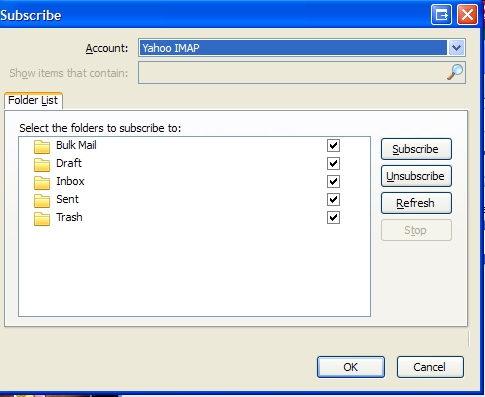

Yahoo puts spam messages into a folder 'Bulk Mail'. Designate 'Bulk Mail' as Thunderbird's spam folder.
Thanks, but if you view your mail on their website the "spam" folder is named spam. I honestly don't care what the name is called (bulk mail, spam, junk, etc) I just want to make sure the folders are showing the same contents.
For some reason this is the only email provider I have this issue with.
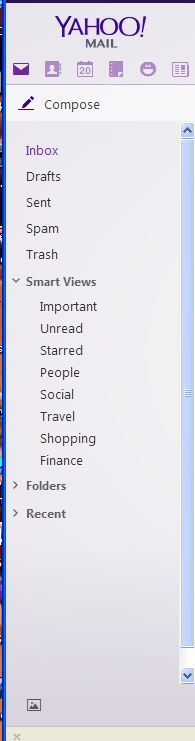
Regardless of what appears on the Yahoo web site, the folder used by Yahoo IMAP is "Bulk Mail"
Solução escolhida
Ok thanks. I wasn't sure if the "Bulk Mail" folder in TB was syncing with the "Spam" folder online so I wouldn't miss anything that ends up in there.