


Firefox crashes - every day, several times.

When I close it - there is always a message box about the plug-in container having crashed.
This is becoming a major inconvenience, having to shut down and re-start Firefox every 20 minutes or so....
I am considering replacing it with Chrome.
Todas as respostas (7)
We're sorry to hear that Firefox is crashing. In order to assist you better, please follow the steps below to provide us crash IDs to help us learn more about your crash.
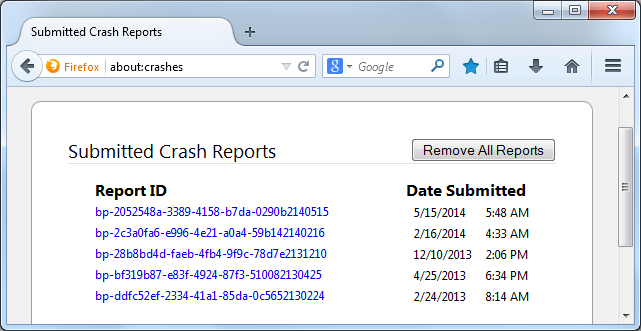
- Enter about:crashes in the Firefox address bar and press Enter. A Submitted Crash Reports list will appear, similar to the one shown below.
- Copy the 5 most recent Report IDs that start with bp- and then go back to your forum question and paste those IDs into the "Post a Reply" box.
Note: If a recent Report ID does not start with bp- click on it to submit the report.
(Please don't take a screenshot of your crashes, just copy and paste the IDs. The below image is just an example of what your Firefox screen should look like.)
Thank you for your help!
More information and further troubleshooting steps can be found in the Troubleshoot Firefox crashes (closing or quitting unexpectedly) article.
I can't do that - Firefox never *officially* crashes - it just gets stuck in "not-responding" mode and I have to terminate from within the task manager. As a result - it doesn't generate a crash report. What it does is waste time and cause me to loose my links. It *just* did it again, and I checked - no crash report.

Upgrade to Firefox 41.01
According to firefox, I *already* have the newest version - but it continues to happen.
At least I was able to get the problem signature:
Problem signature:
 Problem Event Name:	APPCRASH
 Application Name:	plugin-container.exe
 Application Version:	41.0.0.5738
 Application Timestamp:	55fb7072
 Fault Module Name:	mozglue.dll
 Fault Module Version:	41.0.0.5738
 Fault Module Timestamp:	55fb5afb
 Exception Code:	80000003
 Exception Offset:	0000ec7e
 OS Version:	6.1.7601.2.1.0.256.48
 Locale ID:	1033
 Additional Information 1:	0a9e
 Additional Information 2:	0a9e372d3b4ad19135b953a78882e789
 Additional Information 3:	0a9e
 Additional Information 4:	0a9e372d3b4ad19135b953a78882e789
You can check for problems with current Shockwave Flash plugin versions and try this:
- make sure you have the latest Flash version:
http://www.adobe.com/special/products/flashplayer/fp_distribution3.html - check for updates for your graphics drive drivers
https://support.mozilla.org/kb/upgrade-graphics-drivers-use-hardware-acceleration - disable protected mode in the Flash plugin (Windows Vista and later)
https://support.mozilla.org/kb/adobe-flash-protected-mode-firefox - disable hardware acceleration in the Flash plugin
https://helpx.adobe.com/flash-player/kb/video-playback-issues.html - disable hardware acceleration in Firefox
https://support.mozilla.org/kb/upgrade-graphics-drivers-use-hardware-acceleration
See also:
The crash report is several pages of data. We need the report numbers to see the whole report.