


How do I roll back to the version prior to TB38?

Until the bug regarding the contacts list showing "all address books" instead of just "personal address book" is resolved, I would like to roll back to the previous version.
While in Write, clicking on View, I can choose whether or not to show the contacts list. There is no choice to select which address book to show as default.
Solução escolhida
The 'b' denotes a beta version. The last full version was 31.7.0 (IIRC)
https://ftp.mozilla.org/pub/mozilla.org/thunderbird/releases/31.7.0/
You don't need to remove or uninstall your current version.
Ler esta resposta no contexto 👍 1Todas as respostas (6)
My Contacts Sidebar has a button that offers a drop-down list of available address books.

Old versions are available here: https://ftp.mozilla.org/pub/mozilla.org/thunderbird/releases/
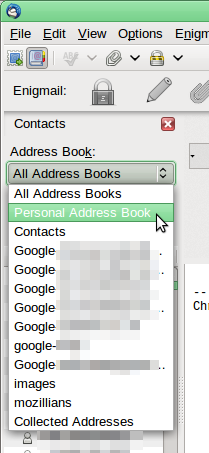
Modificado por Zenos a
There is a list of previous versions at this URL. Now how does one roll back to that version?
It's a repository of installers.
Locate your version, then your platform, and then your language, at which point you're shown an installer executable. Select it, download it. Run it.
Which one is the version just prior to 38.0.1 ? What does 0b1 to 0b6 signify? Should I assume that I want 37.0b1 dated 11 March 2015?
Do I need to delete the current version before downloading?
[DIR] 36.0b1/ 14-Feb-2015 02:14 - [DIR] 37.0b1/ 11-Mar-2015 10:58 - [DIR] 38.0.1/ 10-Jun-2015 04:00 - [DIR] 38.0b1/ 01-Apr-2015 13:36 - [DIR] 38.0b2/ 17-Apr-2015 13:09 - [DIR] 38.0b3/ 24-Apr-2015 21:23 - [DIR] 38.0b4/ 02-May-2015 03:46 - [DIR] 38.0b5/ 14-May-2015 05:23 - [DIR] 38.0b6/ 22-May-2015 15:37 - [DIR] custom-updates/ 17-Dec-2013 21:28 - [DIR] latest-10.0esr/ 05-Jan-2013 20:36 - [DIR] latest-24.0esr/ 24-Sep-2014 10:02 - [DIR] latest-31/ 08-May-2015 10:31 - [DIR] latest-beta/ 22-May-2015 15:37 - [DIR] latest-esr/ 18-Nov-2013 20:59 - [DIR] latest/ 10-Jun-2015 04:00 -
Solução escolhida
The 'b' denotes a beta version. The last full version was 31.7.0 (IIRC)
https://ftp.mozilla.org/pub/mozilla.org/thunderbird/releases/31.7.0/
You don't need to remove or uninstall your current version.
Thank you so much.