

Esta discussão foi arquivada.
Se precisar de ajuda, por favor, coloque uma nova questão.

Arquivadas
revert to old style address fields

TB updated to 31.3 and it has the new fields that are grayed out until you move onto them.
I went back to 31.0 and they still display this way. How can I go back to the older style of from/to/subject fields. This new setup is not nice to use.
TB updated to 31.3 and it has the new fields that are grayed out until you move onto them.
I went back to 31.0 and they still display this way. How can I go back to the older style of from/to/subject fields. This new setup is not nice to use.
Todas as respostas (2)
Yes it can, but you need to follow these instructions:
How to locate Profile folder
make hidden files and folders visible:
In Thunderbird
- Help > Troubleshooting Information
- click on 'show Folder' button
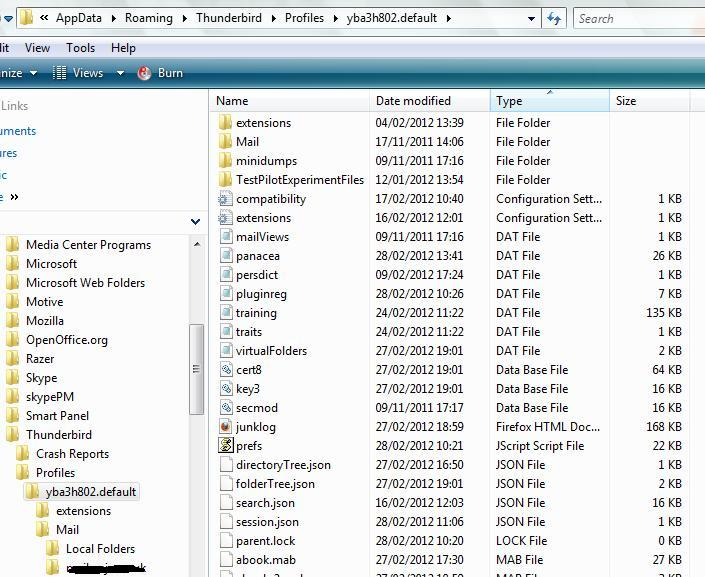
- a new window opens showing profile folders - It will look similar to first image below.
- Close Thunderbird now - this is important -
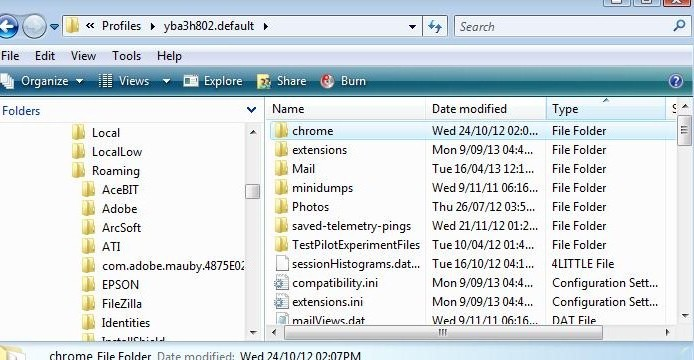
- Create a new folder called chrome - note the spelling. So it Profile folder looks like the second image below.
Open 'Notepad' then click on the link below and read comment 8:
Copy paste all the contents as advised in comment 8 at the link into notepad Save the file as userChrome.css (note the spelling) in the chrome folder.
Restart thunderbird.
Modificado por Toad-Hall a
That takes care of it. Thanks.