


Thunderbird keeps asking for my gmail password - is this a virus?

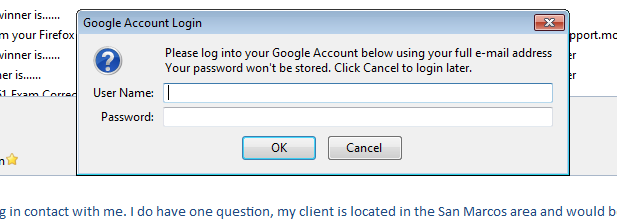
Each time I open Thunderbird, and sometimes in the middle of working, Thunderbird displays this dialog box: "Please log into your Google Account below using your full e-mail address. Your password won't be stored. Click Cancel to login later."
Thunderbird still functions, although maybe I don't have access to my full contact list? Is this a TB dialog box? Will entering my PW fix it?
Thank you!

Gekozen oplossing
gContactSync synchronizes contacts & groups between Thunderbird and Google Contacts. I'm not using this extension, however, you'll need to grant permission for the extension to access your Google Contacts once. If you haven't done that yet, the password prompt is most likely coming from the extension.
You can verify this by disabling gContactSync in the Add-on Manager. Restart Thunderbird and verify if you get the password prompt. If not, then you know it's the extension.
If you don't use the extension at all simply uninstall it.
Alle antwoorden (7)
Doesn't sound like a Thunderbird prompt to me. Can you post a screenshot?
http://support.mozilla.org/en-US/kb/how-do-i-create-screenshot-my-problem
Yes - thank you! Snip is below.
Do you use Lightning, and do you have a Google Calendar?
Thank you both for your help! I ran task manager, and there were a few processes that I didn't recognize, but none of them went away when I clicked cancel. I do have a google calendar, and I investigated Lightning, but I don't have the add-on.
I just checked my add-ons and the only one I installed is gContactSync 0.3.6. Could this be the culprit? Should I remove and reinstall?
Try also add again you accout to Thunderbird:
Also:
Gekozen oplossing
gContactSync synchronizes contacts & groups between Thunderbird and Google Contacts. I'm not using this extension, however, you'll need to grant permission for the extension to access your Google Contacts once. If you haven't done that yet, the password prompt is most likely coming from the extension.
You can verify this by disabling gContactSync in the Add-on Manager. Restart Thunderbird and verify if you get the password prompt. If not, then you know it's the extension.
If you don't use the extension at all simply uninstall it.
Perfect - that did it. Appreciate the help from everyone!