


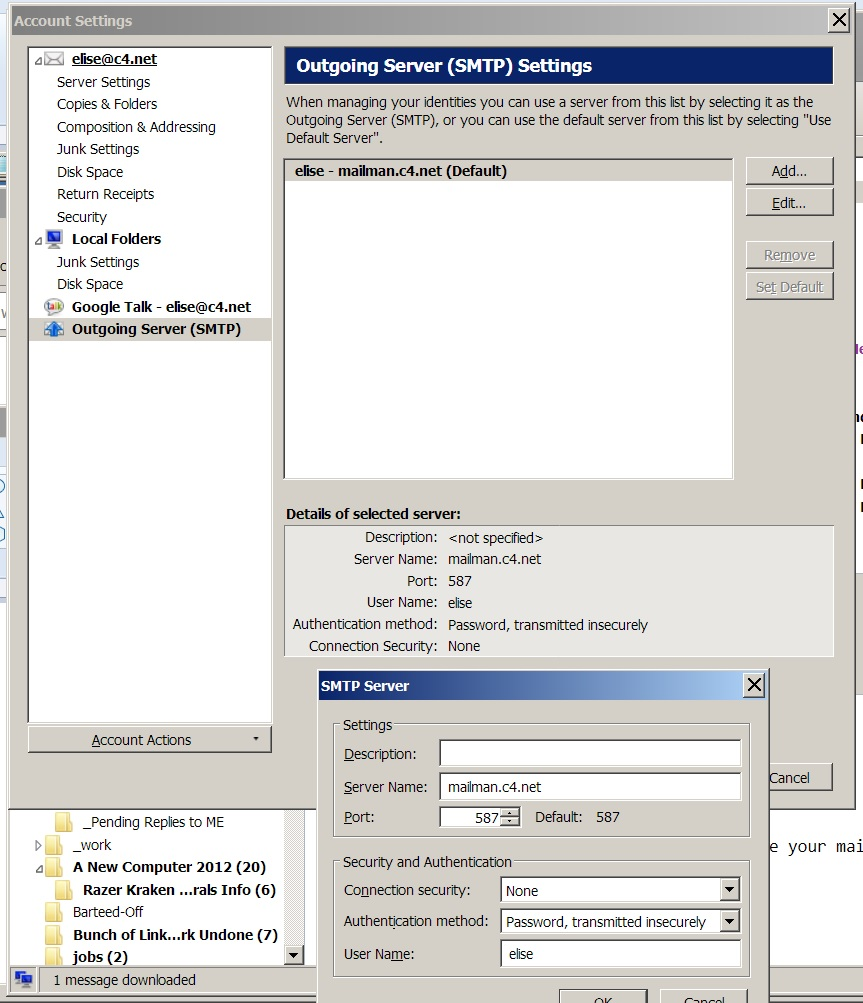
cannot locate 'Advanced' button to display 'Advanced Outgoing Server (SMTP) Settings'

An email to a regular recipient returned a 'Delivery Failure', instructing me to config my client to use "authentication." Last emailed recipient late Dec 2017, no problem.
These are the instructions my mailbox provider (human geek owns business) gave me today: "Here are the steps to configure Thunderbird to use SMTP Authentication. 1. From the top menu, click on "Tools," select "Account Settings," which will bring up the "Account Settings" dialog box. 2. Select "Outgoing Server (SMTP)"
- DO NOT HAVE THIS:
3. Click "Advanced," which will bring up the "Advanced Outgoing Server (SMTP) Settings" dialog box.
4. Select the SMTP server you want to configure, click "Edit," this will bring up the "SMTP Server" dialog box. 5. Check "User name and password." 6. Enter your full email address in the "User name" field. 7. Click "OK" and close all dialog boxes.
Gekozen oplossing
well, sfhowes and matt ... i resent the email before doing anything else, and it hasn't returned, which it quickly had the first time (delivery failure) and there you have it: that old "have symptoms? go to doc: they DISAPPEAR" trick. heck if i know. i'm considering this resolved, and i blame Elon. thanks for your help, supporters. ♥
Alle antwoorden (5)
so ... why did i get this response?
"Could not deliver message to the following recipient(s):
Failed Recipient: xxxxxx@mindspring.com
Reason: Remote host said: 550 Please configure your mail client to use authentication."
how do i correct not having authentication enabled for this recipient?
is this what seems to be missing? "6. Enter your full email address in the "User name" field."
it's not my "full email address" it's just my name ...
odd that it didn't occur with the previous email to this recipient.
thanks for your help.
thanks. "they imply" and "their mail server" and "their instructions" meaning ... ? nevertheless, i will sleep on it and start fresh later. hopefully this won't change sending emails to all the other folks i communicate with ... ;) still don't understand the "Delivery Failure" not being across the board, having sent loads of other emails elsewhere successfully. (if i click the blue top hat and magic wand button, does a mountain goat pop out with a chocolate cake ... ?) appreciate your efforts.
What does mindspring have to do with this? Are they your ISP?
Gekozen oplossing
well, sfhowes and matt ... i resent the email before doing anything else, and it hasn't returned, which it quickly had the first time (delivery failure) and there you have it: that old "have symptoms? go to doc: they DISAPPEAR" trick. heck if i know. i'm considering this resolved, and i blame Elon. thanks for your help, supporters. ♥