


Restore Classic Print Preview Dialog Box UI in Mozilla thunderbird

how to Restore Classic Print Preview Dialog Box UI in Mozilla THUNDERBIRD your dialog box sucks
Alle antwoorden (4)
Click 'Print using the system dialog..' in the right pane of the Print window (see picture).
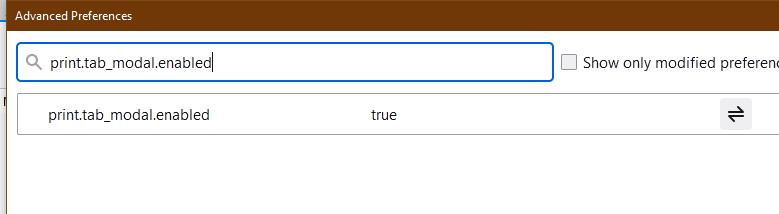
Toggle print.tab_modal.enabled in Preferences/General/Indexing/Config. editor to make the setting permanent.
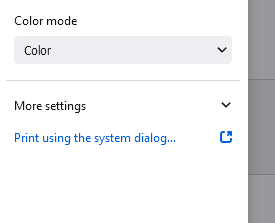

Following your instructions, the Windows system dialog box that comes up shows my printers and there is a Preferences tab, but that is options only for each specific printer I select. There is no "Preferences/General/Indexing/Config. editor" as you state. I am aware of the print.tab_modal.enabled selection that Firefox has, but in general does not exist or is hidden in Thunderbird. How, specifically can one get into the "editor" you listed so that selection can be toggled?
Jim.R.Benfer.Jr said
Following your instructions, the Windows system dialog box that comes up shows my printers and there is a Preferences tab, but that is options only for each specific printer I select. There is no "Preferences/General/Indexing/Config. editor" as you state. I am aware of the print.tab_modal.enabled selection that Firefox has, but in general does not exist or is hidden in Thunderbird. How, specifically can one get into the "editor" you listed so that selection can be toggled?
I mean Preferences in TB, not in the printing dialog (see picture). Open Preferences from the main window and type editor in the Find box.

To sfhowes:
Yours was the first answer that I found, after searching for the better part of two days, that returned T'Bird 's Print Preview. Not the same as before, but workable! A couple of weeks ago I regressed to version 70-something to find the print preview only to discover that my Address Book had disappeared. So, now all is good with T'Bird and now I don't have to change e-mail clients after over 20 years with T'Bird!! Thank you.
Sparky