


Stop Search Suggestions in the Awesome Bar

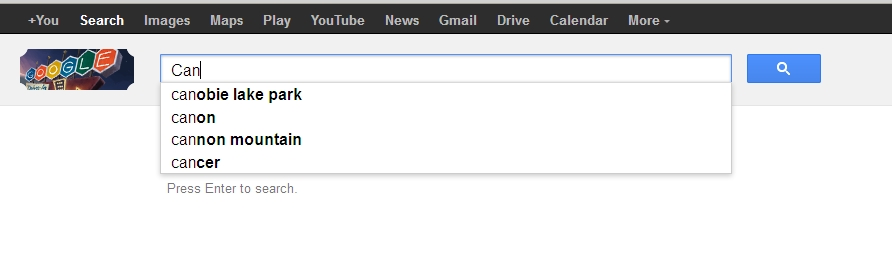
Google is my default search engine. I followed the instructions to turn off Search Suggestions in Firefox 13. Unfortunately, this only seems to work if I search from the Search Bar. If I search from the Awesome Bar, which I prefer, Search Suggestions still appear. Can I prevent search suggestions from the Awesome Bar as well? I can do this in Google Chrome - please tell me I can do it in Firefox!
The way to do this in Chrome is enter the following URL as your default search engine:
https://www.google.com/search?hl=en&complete=0&site=webhp&q=%s&btnK=Google+Search
I don't see a way to do this in Firefox 13. BTW, the above URL also prevents Google Autocomplete and Google Instant.
Penyelesaian Terpilih
ok, thanks for clarifying - you can enter about:config into the locationbar and search for the preference named keyword.url. doubleclick & set it to https://www.google.com/search?hl=en&complete=0&site=webhp&q= - this should also redirect searches from the firefox location bar to the google version without suggestions.
Diubah oleh philipp
All Replies (4)
hello the suggestions on the awesomebar are suggestions by your bookmarks & history & shouldn't be provided by google. you can disable those in firefox/tools > options > privacy > location bar - suggest nothing...
My Firefox options already include "Suggest nothing". What I am seeing does not come from my Bookmarks or History. These are Search Suggestions. Please see the attachment.
Penyelesaian Terpilih
ok, thanks for clarifying - you can enter about:config into the locationbar and search for the preference named keyword.url. doubleclick & set it to https://www.google.com/search?hl=en&complete=0&site=webhp&q= - this should also redirect searches from the firefox location bar to the google version without suggestions.
Diubah oleh philipp
That solved it. Thank you.