Sent messages do not appear in mail threads

In most emails, when you have a mail thread/conversation, you get to see everything you received and sent grouped in that thread. However, the messages I send do not appear in these groups and this is quite a nuisance. I moved to Thunderbird recently. Overall, I'm enjoying it very much. But the lack of this feature both on the PC (I'm using Fedora Workstation 45, with Thunderbird 160.0 flatpak) and the Google Play Android version is something that can be very annoying or make the threads hard to follow. I've read somewhere that this happens because these mails can only be grouped within the same folder. I wish that feature was improved, and that those mail conversations/threads would show everything I received and wrote, in chronological order.
All Replies (1)
Gabriel Souza said
I've read somewhere that this happens because these mails can only be grouped within the same folder.
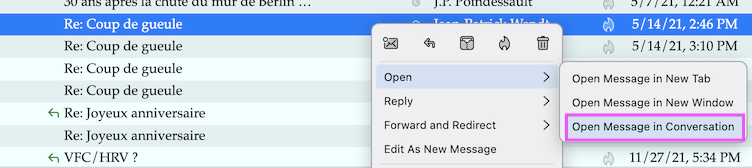
This is a wrong information. The feature is also available in Thunderbird. If you want to use it occasionally you can combine received and sent messages of a discussion via a right-click on one of these messages and selecting "Open Message in Discussion" in the context menu (first image). The entire discussion will be opened in a new message tab
Gabriel Souza said
I wish that feature was improved, and that those mail conversations/threads would show everything I received and wrote, in chronological order.
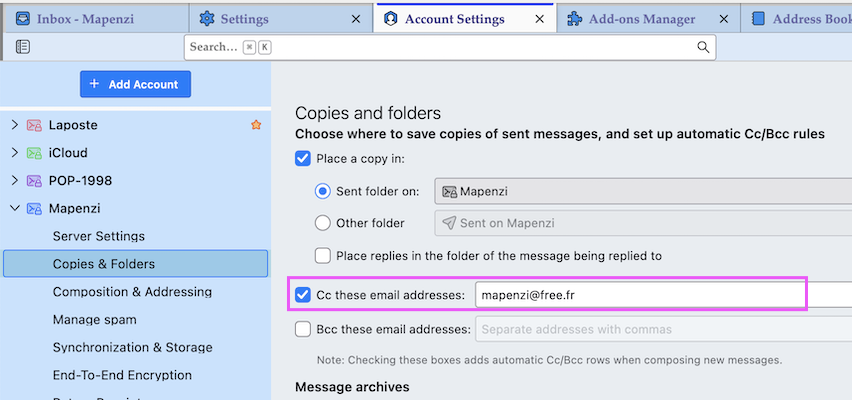
You can also permanently combine received and written messages in the same folder. Click on the app menu ≡ button in the upper right corner of the Thunderbird main window and select "Account Settings" which will be displayed in an new tab. In the left pane go to your account and select "Copies & folders". In the right pane check ✓ "Cc these email addresses" and fill in your email address (2nd picture) Now each time you send an email one copy will be saved in your Sent folder and a second copy will be added to your Inbox folder (3rd picture) To "group" all messages - sent and received - of a discussion in your Inbox go to View > Sort by > Threaded