


Windows 10 reached EOS (end of support) on October 14, 2025. For more information, see this article.

Search Support

Avoid support scams. We will never ask you to call or text a phone number or share personal information. Please report suspicious activity using the “Report Abuse” option.

Learn More

WOFF2 / Google Fonts render incorrectly after first reload

  • Tiada balasan
  • 0 ada masalah ini

Hi Firefox support,

I’m experiencing a persistent issue with Google Fonts (.woff2) on Windows 10. Only on some but not all pages whoch are using Google Font woff2: Fonts display correctly after starting Firefox, but as soon as I reload the pages with for the first time, they appear corrupted and remain broken. Private Browsing mode renders the fonts correctly, and Chrome does not have this problem.

Below is a detailed list of everything I’ve tried with ChatGPT so far to troubleshoot the issue.

(OS: latest Windows 10)

Browser: Firefox (freshly installed, no sync)

Behavior:

Example site: https://www.linguee.de/

Steps already attempted:

Disabled all extensions

Tested in Firefox Safe Mode / Troubleshoot Mode

Created a new Firefox profile

Fresh Firefox installation without signing in

Deleted all relevant caches:

%LOCALAPPDATA%\Mozilla\Firefox\Profiles\<profile>\cache2

%LOCALAPPDATA%\Mozilla\Firefox\Profiles\<profile>\storage

%APPDATA%\Mozilla\Firefox\Profiles\<profile>\startupCache

%LOCALAPPDATA%\Mozilla\

Verified / adjusted Firefox config in about:config:

browser.display.use_document_fonts = 1

gfx.webrender.all = false

WebRender running in WebRender (Software) mode

privacy.resistFingerprinting = false

browser.cache.disk.enable = false

network.http.rcwn.enabled = false

accessibility.force_disabled = 1

Disabled hardware acceleration for testing

Tested DirectWrite / Direct3D settings

Recalibrated ClearType

Ran sfc /scannow to repair system fonts

Temporarily disabled antivirus / web protection

Tested behavior in private mode versus normal mode

Observed that hard reload (Ctrl + F5) does not fix fonts

Noted that only .woff2 (Google Fonts) are affected; system fonts render normally

Summary:

Issue is not caused by extensions, profile, cache, or a fresh install

Private Browsing works → problem is related to persistent normal-mode caching or rendering

Only occurs in normal windows, consistently reproducible after first reload

Problem seems specific to .woff2 font handling and Firefox’s rendering pipeline on Windows 10
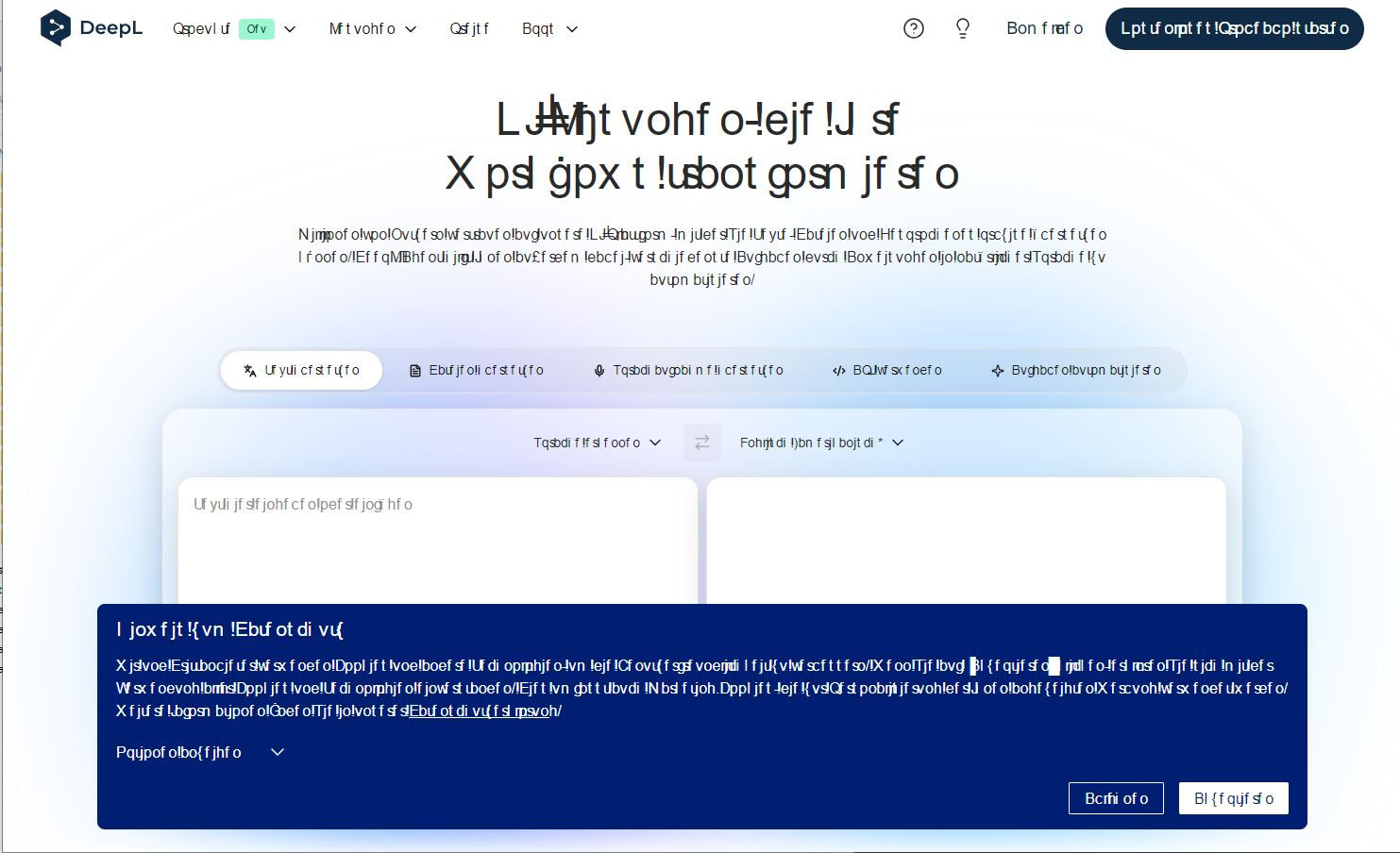
Hi Firefox support, I’m experiencing a persistent issue with Google Fonts (.woff2) on Windows 10. Only on some but not all pages whoch are using Google Font woff2: Fonts display correctly after starting Firefox, but as soon as I reload the pages with for the first time, they appear corrupted and remain broken. Private Browsing mode renders the fonts correctly, and Chrome does not have this problem. Below is a detailed list of everything I’ve tried with ChatGPT so far to troubleshoot the issue. (OS: latest Windows 10) Browser: Firefox (freshly installed, no sync) Behavior: Example site: https://www.linguee.de/ Steps already attempted: Disabled all extensions Tested in Firefox Safe Mode / Troubleshoot Mode Created a new Firefox profile Fresh Firefox installation without signing in Deleted all relevant caches: %LOCALAPPDATA%\Mozilla\Firefox\Profiles\<profile>\cache2 %LOCALAPPDATA%\Mozilla\Firefox\Profiles\<profile>\storage %APPDATA%\Mozilla\Firefox\Profiles\<profile>\startupCache %LOCALAPPDATA%\Mozilla\ Verified / adjusted Firefox config in about:config: browser.display.use_document_fonts = 1 gfx.webrender.all = false WebRender running in WebRender (Software) mode privacy.resistFingerprinting = false browser.cache.disk.enable = false network.http.rcwn.enabled = false accessibility.force_disabled = 1 Disabled hardware acceleration for testing Tested DirectWrite / Direct3D settings Recalibrated ClearType Ran sfc /scannow to repair system fonts Temporarily disabled antivirus / web protection Tested behavior in private mode versus normal mode Observed that hard reload (Ctrl + F5) does not fix fonts Noted that only .woff2 (Google Fonts) are affected; system fonts render normally Summary: Issue is not caused by extensions, profile, cache, or a fresh install Private Browsing works → problem is related to persistent normal-mode caching or rendering Only occurs in normal windows, consistently reproducible after first reload Problem seems specific to .woff2 font handling and Firefox’s rendering pipeline on Windows 10
Lampirkan skrinsyot

You must log in to your account to reply to posts. Please start a new question, if you do not have an account yet.