


Upper Right-Hand Corner is Weird
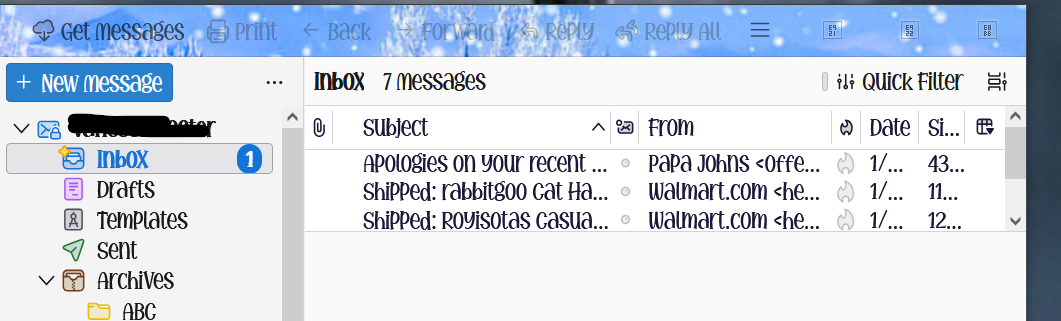
I posted this question some time back but didn't receive any helpful answers and don't know where my post is. In the upper right-hand corner there is suppose to be 3 symbols. One to lower the app, one to make the app full screen or partial and one with an X. I have jumbled symbols where the 3 good ones are. It does it in trouble shoot mode. I tried disabling addons but I can't get the normal symbols back. Here's what it looks like... Thank you for any help.
All Replies (6)
I'm quite new to Thunderbird myself, but at a guess it is probably because of the font (or addon) you are using for the menus etc, which maybe cannot display the symbols used for minimize, maximize and close. Sorry I don't know any more, I'm still learning myself.
I haven't added anything I haven't added any new extensions. I haven't changed the theme. I haven't added or changed any fonts. But it's still got the top right hand corner three icons are not the way they should be they look like something that shouldn't be there.

The earlier discussion is here: https://support.mozilla.org/en-US/questions/1560414
That the problem does not occur in troubleshooting mode suggests that the answer that I gave you then may be correct. If it is not correct, then the cause of the problem lies in the other things mentioned at the end of the article that I directed you to.
When you disabled add-ons, did you disable that theme? And re-started Thunderbird? And the problem persisted?
Turn off hardware acceleration in Thunderbird settings > General, at the bottom.
Are you using custom CSS?
All of your previous questions, all 8 of them are shown here. https://support.mozilla.org/en-US/user/Vanessalf/questions
The specific question you can not locate, I assume, is https://support.mozilla.org/en-US/questions/1560414
Rick advised you then that the relevant support article contains suggestions as to how to fix the problem the problem. I will be more direct as that more obtuse approach appear to miss the mark.
That looks nothing like any font I have seen used in Thunderbird ever. Ipso facto I therefore assume you do in fact have an addon that is installed, probably a theme that is disabled by using safe/troubleshooting mode. See those three square icons on the bar where you expect the minimize maximize and close icons to appear? They are unicode "I don't have that glyph" icons. You chosen font from whatever source it is is not a complete unicode font so those things do not render.
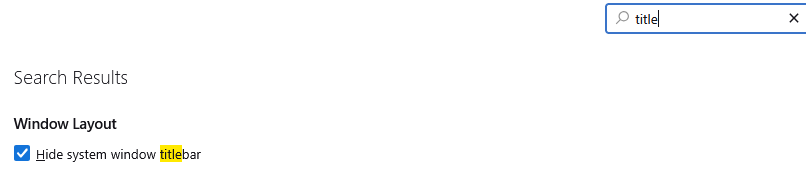
Now you could change the setting to hide the windows title bar to force the use of the standard windows titlebar and buttons, or you could stop using that font. Either will fix the issue.
Rick said
You may be using an add-on that is incompatible with your current Thunderbird version. That's my guess, and it's probably that custom theme that you are using, which was rendered incompatible by a recent update to Thunderbird. If that is the cause, then you should stop using that custom theme and, if you want to use it again in the future, wait to see if the developer updates it.