


How to change date format on email list date column
I am using Thundirbird with Pop_OS 19.10. I have setted the locale to es_ES.
The date is represented with the following format dd/mm/yy hh:mm wich is fine. The problem comes when it has to represent months or days with one digit. When that happens, the dates are not align correctly and it's driving me nuts.
These is what's happening:
dd/mm/yy hh:mm
29/12/19 19:37
1/1/19 2:25 <--
and this is how I would like it to be:
dd/mm/yy hh:mm
29/12/19 19:37
01/01/19 02:25 <--

Diubah oleh jv471
All Replies (5)
then I suggest you set the operating systems default date formatting for a short date to suit your preferences.
Matt said
then I suggest you set the operating systems default date formatting for a short date to suit your preferences.
My problem is not with the lenght of the date but rather the change in format depending on the date, from "dd/mm/yy hh:mm" to "d/m/yy h:mm"
Diubah oleh jv471
jv471 said
Matt saidthen I suggest you set the operating systems default date formatting for a short date to suit your preferences.My problem is not with the lenght of the date but rather the change in format depending on the date, from "dd/mm/yy hh:mm" to "d/m/yy h:mm"
and is your short date in the operating system defined as DD/MM/YY or D/M/YY The first fills number with leading 0 is the value is single digit. The second does not
Matt said
jv471 saidMatt saidthen I suggest you set the operating systems default date formatting for a short date to suit your preferences.My problem is not with the lenght of the date but rather the change in format depending on the date, from "dd/mm/yy hh:mm" to "d/m/yy h:mm"
and is your short date in the operating system defined as DD/MM/YY or D/M/YY The first fills number with leading 0 is the value is single digit. The second does not
I know and my system date is setted to DD/MM/YY
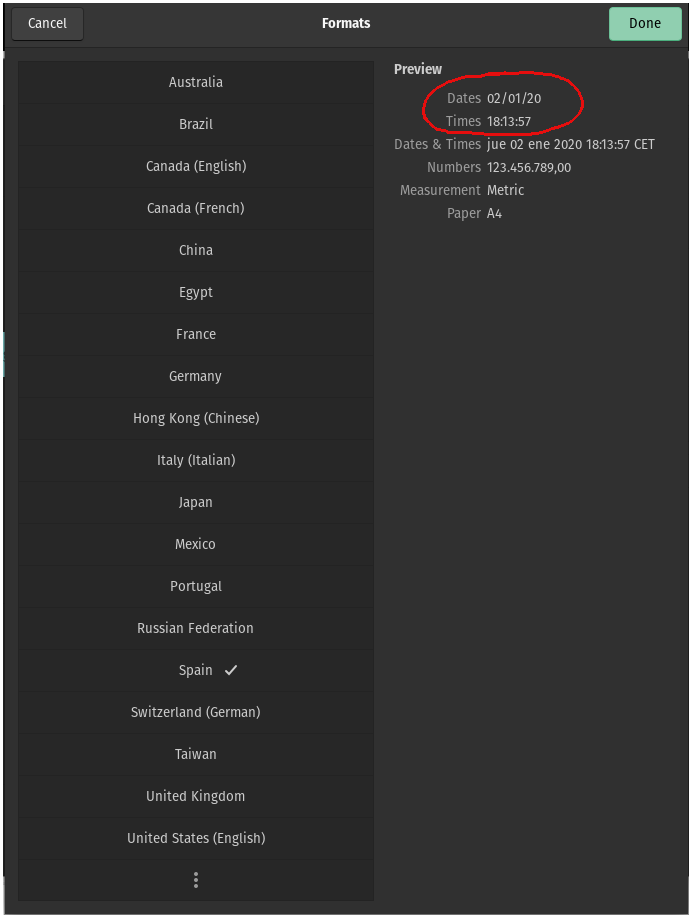
Diubah oleh jv471
Thunderbird takes date and time info from your OS, so something is not set as you would expect. Cannot locate info on 19.10, but see if this info helps for 18.04: