


When composing an email to send I'm noticing that long urls that I paste into an email don't wrap within the email.

I'm a retired Desktop Support tech more familiar with Outlook, still very new to Thunderbird. I enjoy supporting family & friends and often email urls for various reasons. What setting do I need to tweak in Thunderbird to get long urls that I paste into emails to send to wrap within the composed email?
Chosen Solution
Matt, I'm running Thunderbird 149.0.2. I've been experimenting pasting various urls from different sites and it seems that the only urls that won't wrap are from ebay. I was trying to help a friend looking for a router and when that LONG url was pasted it wouldn't wrap. The problem seems to be Thunderbird doesn't like long urls with lots of % signs. Not being a web master I searched and found this: The percent sign (%) in web URLs is used for percent-encoding (or URL encoding), a mechanism to represent special, reserved, or unsafe characters that cannot be used directly in a web address." I'm thinking something about the percent sign breaks the wrapping. Since this only seems to be a problem for me with eBay urls I'm going to say this issue is resolved. Thanks to everyone for their input.
All Replies (5)

I know of no way to do that. However, if your goal is to make the target of the URL more descriptive or obvious, and you're composing a message in HTML format, you could use the "Add Link" button which will let you add a shorter description of the URL. See the attached image.
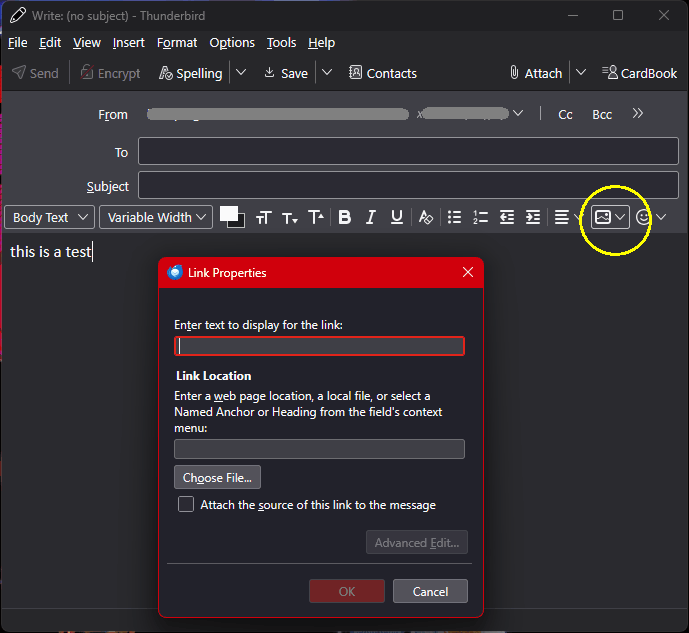
Lin, thanks for responding. Your suggestion doesn't quite fulfill my hope. I may just have to get used to the difference from what I'm accustomed to.
What version of Thunderbird are you using.
If I paste this link in to Thunderbird https://support.microsoft.com/en-au/windows/windows-startup-settings-1af6ec8c-4d4a-4b23-adb7-e76eef0b847f
I get this
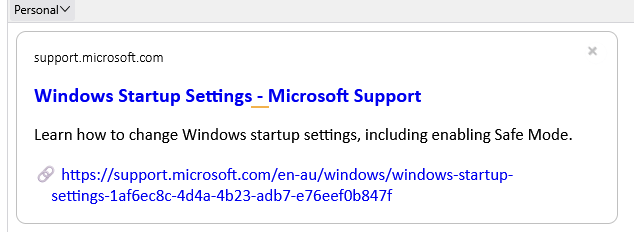
If I disable the preview that is enabled in setting be default I get

Now I did have to make my default compose window much smaller to force a wrap because the link was not anything like long enough to require wrapping normally, but it does wrap when space requires it.
So to be honest I am confused. I can not establish this "unwrapped" state of which you talk.
Now as an Outlook refugee, you might be expecting pasted links to appear in the body of an email as a link. That processing does not occur until you click send or save the mail to drafts and open it again from there. There is difference of opinion from the Thunderbird developers and Outlook developers as to which is the more convenient, knowing an arcane keystroke to edit a pasted link or just editing it but loosing the click to check accuracy of the link outlook offers. I can see both opinions and have grown used to the Thunderbird approach.
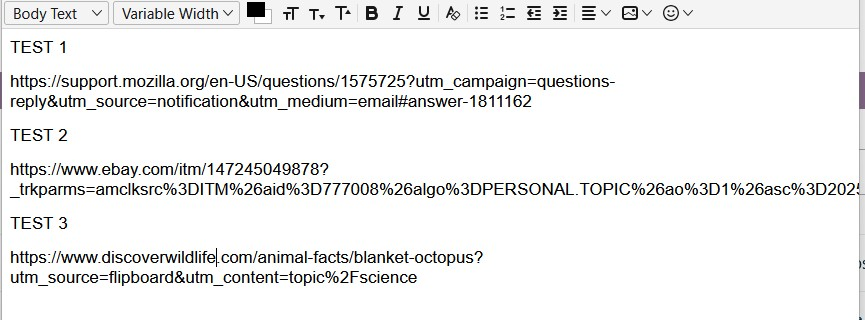
This problem arose for me when I was sending a url for a router on ebay to a friend. It was unusually long and ran off the right edge of the message window. Today I've been experimenting with pasting other long urls from a different source, not eBay. They seem to wrap. In the attached pic Test 1 is the url for this issue on Mozilla.org. It wraps like I would expect. Below that Test 2 is a url from eBay that doesn't wrap and runs way off the window. It is a horrendously long url. Test 3 is a long url from Flipboard.com that was redirected to discoverwildlife.com. It wraps just fine. Maybe my problem running off the right edge is only with eBay, particularly urls from them that have multiple % signs. Not being a webmaster I searched for info on it's use and got this: The percent sign (%) in web URLs is used for percent-encoding (or URL encoding), a mechanism to represent special, reserved, or unsafe characters that cannot be used directly in a web address". So it may be that my only, real problem is trying to past such urls. Other seem to work. What do you think?
Modified by Supertech
Chosen Solution
Matt, I'm running Thunderbird 149.0.2. I've been experimenting pasting various urls from different sites and it seems that the only urls that won't wrap are from ebay. I was trying to help a friend looking for a router and when that LONG url was pasted it wouldn't wrap. The problem seems to be Thunderbird doesn't like long urls with lots of % signs. Not being a web master I searched and found this: The percent sign (%) in web URLs is used for percent-encoding (or URL encoding), a mechanism to represent special, reserved, or unsafe characters that cannot be used directly in a web address." I'm thinking something about the percent sign breaks the wrapping. Since this only seems to be a problem for me with eBay urls I'm going to say this issue is resolved. Thanks to everyone for their input.