


Connecting Thunderbird to Google Tasks

I'm a retired IT Tech and supported MS Outlook with Exchange for years. Lately I've tired of the constant bickering between Google and MS that just seem to make using Outlook at home difficult. I've been working on Migrating from MS Outlook to Thunderbird v147.0.1. I had a large PST file with Saved Items and it's been a struggle to process all that but finally got connected to Gmail, converted/imported the PST items and then began working on Calendar. Finally got all that working and I'm now having trouble getting Google Tasks connected to Thunderbird. Google doesn't seem to be exposing the Tasks feed via CalDAV. Has anyone run into this before and does anyone have any suggestions to resolve? Thanks.
Chosen solution
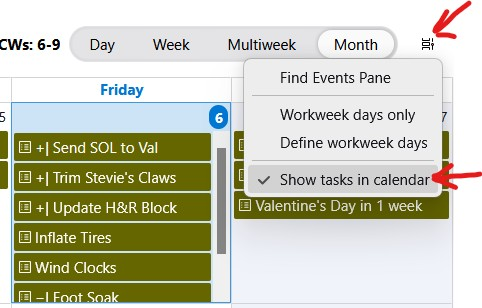
sfhowes, Thanks for responding. I think we were both talking about slightly different things. I wanted to display Events/Appointments AND Tasks in the same Calendar tab. First I had to add Tasks to Thunderbird and then Today I stumbled across the "Show tasks in calendar" option. Once that was selected I got it. Thanks for helping me get better acquainted with Thunderbird.
Added notation: When you mentioned the "Today Pane" I was not yet familiar with what that was and where I could flip it on. I have since discovered how to do that and better understand one more aspect of a new Mail client. Thanks again.
Read this answer in context 👍 1All Replies (4)
The built-in CalDAV doesn't support Google Tasks, so use this add-on:
https://addons.thunderbird.net/en-US/thunderbird/addon/provider-for-google-calendar/
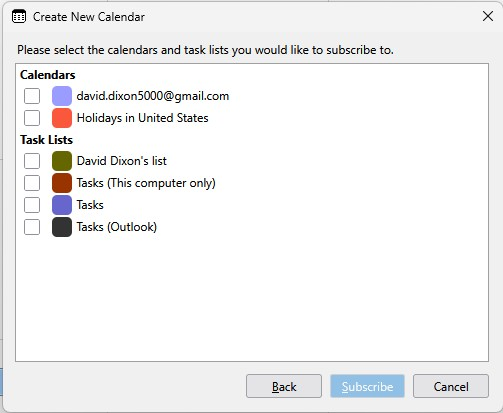
sfhowes, Thanks for responding. I was able to install the Add-on and get to the choice of Tasks - I had 4 listed. Apparently I chose the wrong one at first and nothing appeared in Thunderbird. I was finally able to choose the correct one and Tasks now appear in Thunderbird on the Task tab. Is there any way to also get them to appear in the Calendar tab along with Appointments like they appear in Google Calendar?
Show the Today Pane, in either the Calendar tab or main window, and click the < and > buttons at the top to toggle between Events, Tasks or Events and Tasks.
Chosen Solution
sfhowes, Thanks for responding. I think we were both talking about slightly different things. I wanted to display Events/Appointments AND Tasks in the same Calendar tab. First I had to add Tasks to Thunderbird and then Today I stumbled across the "Show tasks in calendar" option. Once that was selected I got it. Thanks for helping me get better acquainted with Thunderbird.
Added notation: When you mentioned the "Today Pane" I was not yet familiar with what that was and where I could flip it on. I have since discovered how to do that and better understand one more aspect of a new Mail client. Thanks again.
Modified by Supertech