


Is Spell Checking broken?

Hi. I've downloaded dictionaries and languages, the check spelling option is enabled in the browser settings. However, browser doesn't want to do it automatically. I have to manually enable it with RMB context menu (and re-select languages) for each website individually. Moreover, when the page refreshes, spell checking turning itself off again in RMB menu (but stays enabled in browser options).
Is this really how it's supposed to work?
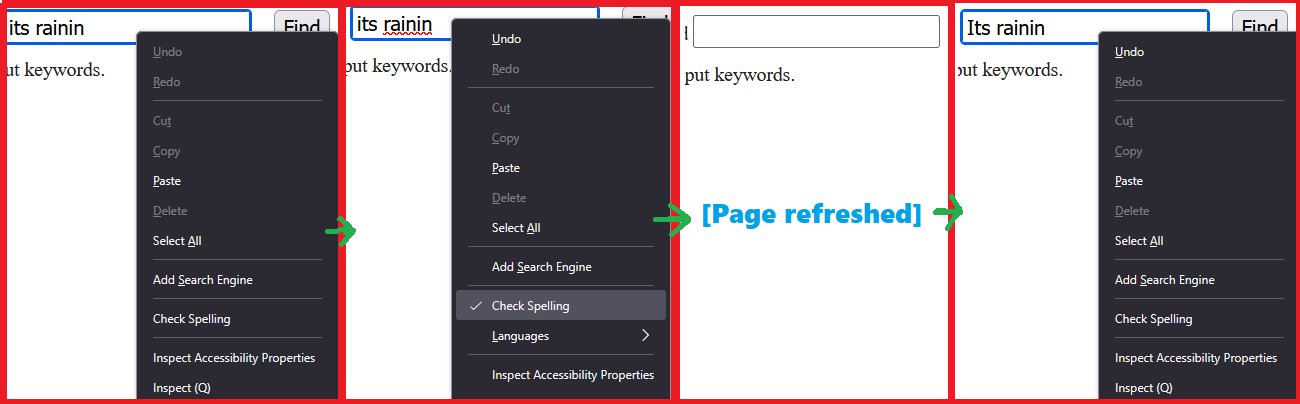
Chosen solution
Managed to kinda solve it with AI help. Still working weird but acceptable. about:config -> layout.spellcheckDefault -> from 1 to 2 Surprised not to see such setting in basic options though.
Read this answer in context 👍 0All Replies (3)
Chosen Solution
Managed to kinda solve it with AI help. Still working weird but acceptable. about:config -> layout.spellcheckDefault -> from 1 to 2 Surprised not to see such setting in basic options though.

Same problem. I have the check box checked. I have the language installed. I have the correct settings in about:config (have tried setting it to both 1 and 2).
It just doesn't work. Ended up installing an extention. Which is bloated and annoying, but at least it actually works.
In Chrome spell check works perfectly.
Rick said
Same problem. I have the check box checked. I have the language installed. I have the correct settings in about:config (have tried setting it to both 1 and 2).
You say language which makes me think you installed a Language Pack and not a Dictionary.
On top of https://addons.mozilla.org/firefox/language-tools/ it gives a basic idea of what each are used for.
Installing a dictionary add-on will add a new language option to your spell-checker, which checks your spelling as you type in Firefox. Language packs change your browser’s interface language, including menu options and settings.
Only a few language locales of Firefox comes with a dictionary due to licensing reasons. https://support.mozilla.org/en-US/kb/how-do-i-use-firefox-spell-checker
A Language Pack is useful for people who want one Firefox install but be able to change their interface between two or more languages and not just use the language locale you downloaded and installed.