


Deleting a email account

Hi, I have googled this and been into the Thunderbird Help section and cannot find an answer. I am having trouble with one of my email accounts, I want to delete it and it and reinstall it. I get to the point in the process where it says to click on Remove Or Remove account but there is no tab or button that is visible to do this. Help here would be greatly appreciated. Regards Mark
Chosen solution
"click on the account" = click on the name of the account that you want to delete. It may be the e-mail address on that account.
Read this answer in context 👍 0All Replies (7)
In account settings, click on the account. There should be a red button at top right.
Chosen Solution
"click on the account" = click on the name of the account that you want to delete. It may be the e-mail address on that account.

I also added an 'incorrect' email account but can't find a way to delete this account. There is no 'red button at the top right" to click on. 2012 Mac Pro OSx 10.14.6 Thunderbird version 115.18.0 (64-bit)
JJ
- Click on the name of the account in the folder pane. The name may be the e-mail address.
- Select "Settings" in the drop-down menu that appears.
- If there is a red "Delete" button, it is at the top right of the window that appears next.
- If there is no red "Delete" button, look at the bottom left of that window for "Account actions" or a gear button or something similar and click on it to see a "delete" option.

1.) Right click on the e-mail account on your main screen. 2.) Choose "Settings" 3.) Bottom left of your account list is "Account Actions" ... Click that 4.) Choose "Remove Account"
Mine also has no red button or anything like that.
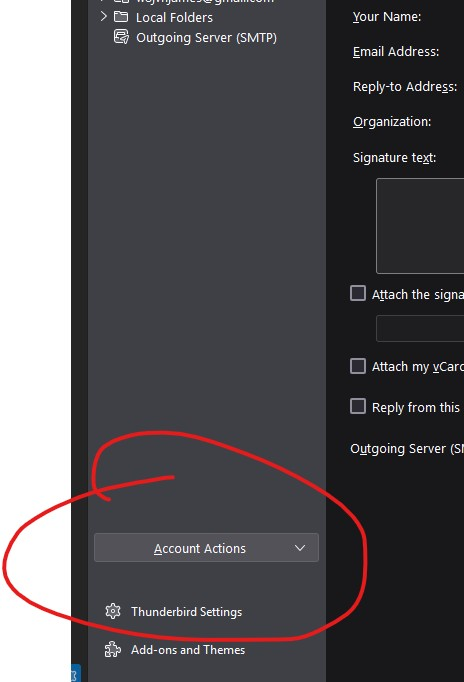
James Freetage said
Mine also has no red button or anything like that.
You must have a non-current version of Thunderbird.