


Why do some websites don´t recognize the version of my browser? How do I fix the problem?

I´ve installed the last version of Firefox, but many web sites, included this one, don´t recognize this version and keep telling me that I´m using an old version of the browser. Some of the sites simply don´t work with the new unrecognized version. I´m using Windows 7 Home Premium (Portuguese) 6.1, and Firefox 7.0.1 (English). What do I have to do to fix the problem? Thank you, Gisele
Vahaolana nofidina
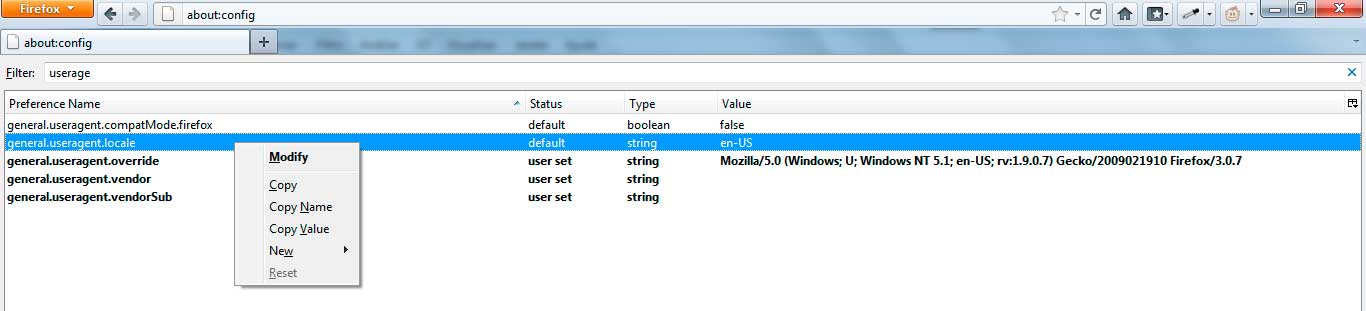
You need to select the pref general.useragent.override just below the one that is selected on your screenshot.
That is the one that is user set (bold) and is causing the problem.
You can right-click the pref general.useragent.override and click the Reset entry in the right-click context menu to reset the pref.
A close and restart of Firefox will remove the pref from the about:config page, but the effect should be immediately.
All Replies (6)
You have a user agent that is corrupted and that identifies you as Firefox/3.0.7
- Mozilla/5.0 (Windows; U; Windows NT 5.1; en-US; rv:1.9.0.7) Gecko/2009021910 Firefox/3.0.7
See:
I just tried to reset my useragent strings, but I have just one of those cited in the recommended article (https://support.mozilla.com/en-US/kb/Websites%20or%20add-ons%20incorrectly%20report%20incompatible%20browser), and yet the reset button is not active. Maybe I´m too dumb to understand the instructions you gave me, but I couldn´t fix the problem.
Vahaolana Nofidina
You need to select the pref general.useragent.override just below the one that is selected on your screenshot.
That is the one that is user set (bold) and is causing the problem.
You can right-click the pref general.useragent.override and click the Reset entry in the right-click context menu to reset the pref.
A close and restart of Firefox will remove the pref from the about:config page, but the effect should be immediately.
It is working now. Thank you very much, cor-el.
You're welcome