


How to delete a language from the spell check?

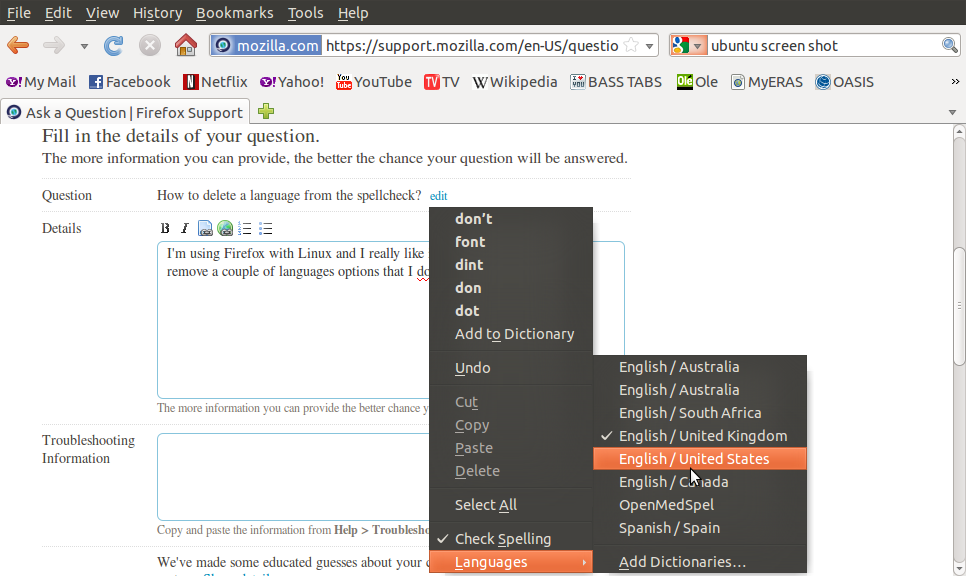
I'm using Firefox with Linux and I really like it. I am wondering how to remove a couple of languages options that I don't use from the spell check. I tried going to tools > Adds on > Languages and disable Firefox (en-AU) Firefox (en-CA) and Firefox (en-GB) but that did not work. I would like to just have English US the Spanish and the medical dictionary.
Vahaolana nofidina
In Linux: Go to the folder /usr/share/hunspell and delete the dictionary files not required. en-AU.dic and associated en-AU.aff or move them to a sub folder. Restart Firefox.
I assume Windows users can search for the file names and do the same.
Hamaky an'ity valiny ity @ sehatra 👍 2All Replies (2)
Here is a picture of my problem. I even have the English from Australia twice! I would really appreciate if some one knows how to change this.

Vahaolana Nofidina
In Linux: Go to the folder /usr/share/hunspell and delete the dictionary files not required. en-AU.dic and associated en-AU.aff or move them to a sub folder. Restart Firefox.
I assume Windows users can search for the file names and do the same.