


Please help me – Thunderbird not recognizing mail files for a pop3

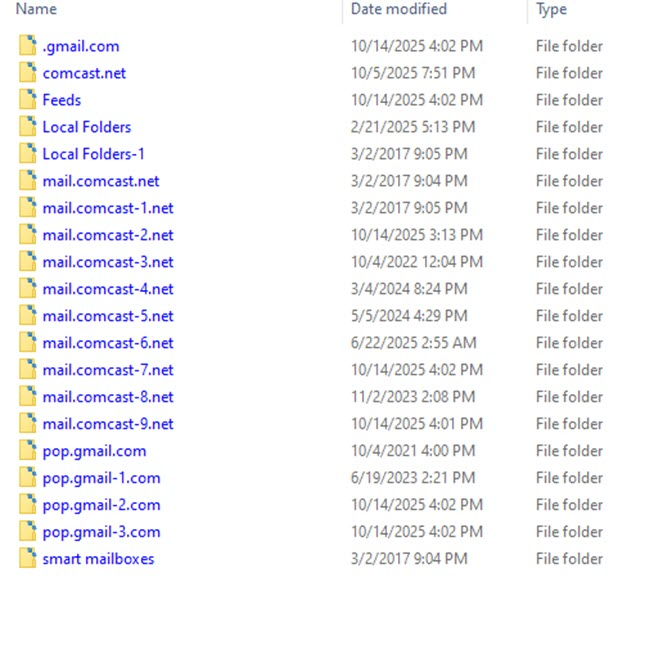
Please help me – Thunderbird not recognizing mail files for a pop3 I am using Thunderbird version 115.10.1 with Windows 10 I have multiple pop3 accounts I deleted one of those accounts in Thunderbird to test another email software. I then deleted that software and added that pop3 account back to Thunderbird However, the reinstalled account does not show any of the emails or folders for that account. They are no longer visible. But when I go here C:\Users\Dale & Cheryl Office\AppData\Roaming\Thunderbird\Profiles\ajcrll97.default\Mail In the “Mail” folder I see the following (see image)
How can I get Thunderbird to recognize the old email directory of all my past email history for the reinstalled pop3 account?
I am grateful for any help that you can provide
Thank You Dale
All Replies (5)
The account '.gmail.com' looks suspicious. The syntax is wrong for an account name. Is that the account in question? Also, to see if there are any folders for an account, you need to click the account name to see them.
David, I agree the syntax is wrong on that account. However, that is for a gmail account that is active since Nov 2010. It is working well although it is a low usage account.
The problem I am having is for a comcast.net account that I have had for over 20 years. It is my primary account. It had hundreds of folders and thousands of emails. However, when I added the account to Thunderbird after removing it, it only has 2 folders, Inbox and Trash.
If someone can help me with this, I would greatly appreciate it. A Nobody
POP accounts have few folders when set up, usually input and trash, with sent added when first message is sent. If your account had hundreds of folders and was a POP account, they were either deleted when you deleted the account, or they are somewhere in your profiles folder. You can search there with these steps: - click help>troubleshootinginformaition - scroll to 'profiles' and click 'about:profiles' - the new screen lists all profile folders, click the OPEN button and then click the Mail folder, and then click through each POP comcast account to see if one of them has the lost folders If you find them, post back for steps to recover them.
David, I am going to have to delay further action for a day or two. I have a brother in his seventies who has just been diagnosed with a very aggressive cancer and a poor prognosis for recovery.
I must devote my time to supporting him for the present time.
However, this is a high priority for me when I come back. Yes, the folders are in the files in the image displayed with my original inquiry. I will get back soon. Thank you for your help.
I wish the best for you and your brother. I'll be here when you return.