


Join us to show up for other Firefox users 🦊. Earn fun badges and Mozilla swag vouchers! Find out more: https://mzl.la/askafox150

Windows 10 reached EOS (end of support) on October 14, 2025. If you are on Windows 10, see this article.

Search Support

Avoid support scams. We will never ask you to call or text a phone number or share personal information. Please report suspicious activity using the “Report Abuse” option.

Learn More

Natao arisiva ity resaka mitohy ity. Mametraha fanontaniana azafady raha mila fanampiana.

Address bar jumps to top of window when I type

  • 2 valiny
  • 0 manana an'ity olana ity
  • 336 views
  • Valiny farany nomen'i Frustrated_John
  • Voavaha

I am one of those old-fashioned guys who has a title bar on the main window, and inside this (from top to bottom) a menu bar (File/Edit/View etc), then the current set of tabs, then the address bar.

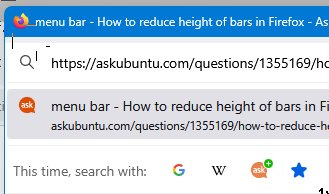
I can click in the address bar and the caret appears, but the moment I start to type anything to edit the URL the address bar jumps up to to the top of the window, covering up the menus and tabs, with a menu of suggested URLs that at times covers most of the rest of the screen. Some images attached to show what I mean.

This started in a recent-ish release -- it didn't use to do this.

How can I prevent this behaviour, so I can just edit a URL in place the way I used to without the address bar jumping to the top of the window?

Currently using FF 135.0 (64-bit), Windows 11.
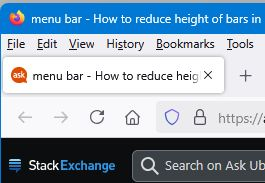
I am one of those old-fashioned guys who has a title bar on the main window, and inside this (from top to bottom) a menu bar (File/Edit/View etc), then the current set of tabs, then the address bar. I can click in the address bar and the caret appears, but the moment I start to type anything to edit the URL the address bar jumps up to to the top of the window, covering up the menus and tabs, with a menu of suggested URLs that at times covers most of the rest of the screen. Some images attached to show what I mean. This started in a recent-ish release -- it didn't use to do this. How can I prevent this behaviour, so I can just edit a URL in place the way I used to without the address bar jumping to the top of the window? Currently using FF 135.0 (64-bit), Windows 11.
Sarin'efijery napaingotra

Novain'i Frustrated_John t@

Vahaolana nofidina

Do you use a custom userChrome.css file?

Try to enter about:config in the address bar and confirm if toolkit.legacyUserProfileCustomizations.stylesheets is false.

Hamaky an'ity valiny ity @ sehatra 👍 1

All Replies (2)

Vahaolana Nofidina

Do you use a custom userChrome.css file?

Try to enter about:config in the address bar and confirm if toolkit.legacyUserProfileCustomizations.stylesheets is false.

Sorry for the delay in replying. Yes, that fixed it. Many thanks. Now all I have to do is remember if there was a reason why it was set true in the first place...!