


How do I turn this off

Good afternoon,
This question is in relation to Thunderbird.
I am trying to send a mail merge (multiple emails) however the attached message is appearing for every email Thunderbird is sending out. It means I have to manually click save or don't save for every automated email it's sending out.
How do I either turn it off so it doesn't save a copy of every email or fix the issue so the message doesn't re appear?
Kind regards, Tom
All Replies (6)
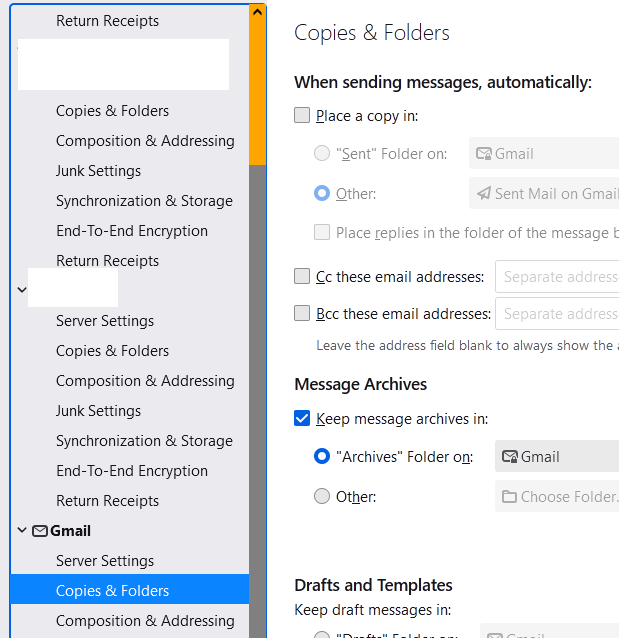
This appears to be a gmail account. Do you have 'Place a copy in' unchecked in Account Settings, Copies & Folders? Gmail automatically copies sent messages to Sent Mail, so TB should be set to not copy sent mail.
Thanks for your reply.
Is the place a copy in account settings in google account or in Thunderbird?
In TB Account Settings (see picture).
Thank you so much! Super grateful.
Hi again,
You were so helpful before, I'm coming back with another issue:
Sending of the message failed. Failed due to unexpected error 80004005. No description is available. The message could not be sent using Outgoing server (SMTP) smtp.gmail.com for an unknown reason. Please verify that your Outgoing server (SMTP) settings are correct and try again.
Any ideas what this could be?
The settings should be: smtp.gmail.com on 465, SSL/TLS, or 587, STARTTLS; authentication = OAuth2, User Name = email address. Do you have a VPN, and what is the antivirus?
This question has been locked because the original author has deleted their account. While you can no longer post new replies, the existing content remains available for reference.