


Import logins & passwords

Is there a way to import the logins that I exported from Firefox Lockwise? The import options appear to be limited to Chrome, and Microsoft browsers.
All Replies (3)
Vahaolana Nofidina
See the note at the bottom of this article about how to enable CSV import via the about:config page.
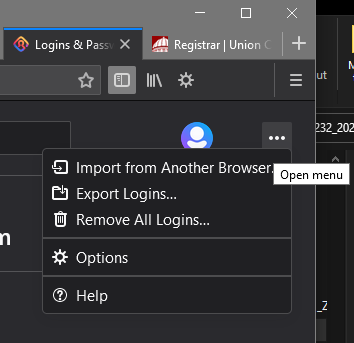
Thank you so much for the prompt response, but the menu option to, "Import from a file" suggested in the article is not available in the menu provided in my Firefox Lockwise window (Note I'm using Firefox v 87.0). I included a snippet of my menu options, using the upload an image feature to illustrate the options available to me.
Additionally, selecting the "Options" option simply takes me to the Browser Privacy Page.
Thanks again, but if you have another suggestion I would be happy to try it out.
You did make sure that this pref is set to true on the about:config page ?
- signon.management.page.fileImport.enabled = true
You can open the about:config page via the location/address bar. You can click the button to "Accept the Risk and Continue".