


Problems with searching

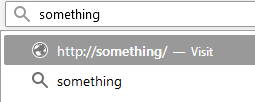
When I type in my search query and press enter it turns into a link instead. If I manually click on the second line then nothing happens, if I press enter also nothing happens. The only way is to click on one of the search engines, but when I click on the one that is set default also nothing happens. Exactly the same thing is with the search bar. I've tried safe mode, but it changes nothing. I think that problem came up after some update. I'm using 58.0b10
Vahaolana nofidina
What search engine is selected if you check this in "Options/Preferences -> Search" ?
Try to rename/remove search.json.mozlz4 and remove search.json, search-metadata.json, search.sqlite in the Firefox profile folder with Firefox closed to reset the search engine database.
You can use the button on the "Help -> Troubleshooting Information" (about:support) page to go to the current Firefox profile folder or use the about:profiles page.
- Help -> Troubleshooting Information -> Profile Directory:
Windows: Show Folder; Linux: Open Directory; Mac: Show in Finder - http://kb.mozillazine.org/Profile_folder_-_Firefox
Start Firefox in Safe Mode to check if one of the extensions ("3-bar" menu button or Tools -> Add-ons -> Extensions) or if hardware acceleration is causing the problem.
- switch to the DEFAULT theme: "3-bar" menu button or Tools -> Add-ons -> Appearance
- do NOT click the "Refresh Firefox" button on the Safe Mode start window
- https://support.mozilla.org/en-US/kb/troubleshoot-firefox-issues-using-safe-mode
- https://support.mozilla.org/en-US/kb/troubleshoot-extensions-themes-to-fix-problems
All Replies (3)
Forgot the image.
Vahaolana Nofidina
What search engine is selected if you check this in "Options/Preferences -> Search" ?
Try to rename/remove search.json.mozlz4 and remove search.json, search-metadata.json, search.sqlite in the Firefox profile folder with Firefox closed to reset the search engine database.
You can use the button on the "Help -> Troubleshooting Information" (about:support) page to go to the current Firefox profile folder or use the about:profiles page.
- Help -> Troubleshooting Information -> Profile Directory:
Windows: Show Folder; Linux: Open Directory; Mac: Show in Finder - http://kb.mozillazine.org/Profile_folder_-_Firefox
Start Firefox in Safe Mode to check if one of the extensions ("3-bar" menu button or Tools -> Add-ons -> Extensions) or if hardware acceleration is causing the problem.
- switch to the DEFAULT theme: "3-bar" menu button or Tools -> Add-ons -> Appearance
- do NOT click the "Refresh Firefox" button on the Safe Mode start window
cor-el said
Try to rename/remove search.json.mozlz4 and remove search.json, search-metadata.json, search.sqlite in the Firefox profile folder with Firefox closed to reset the search engine database.
This have helped, thank you.