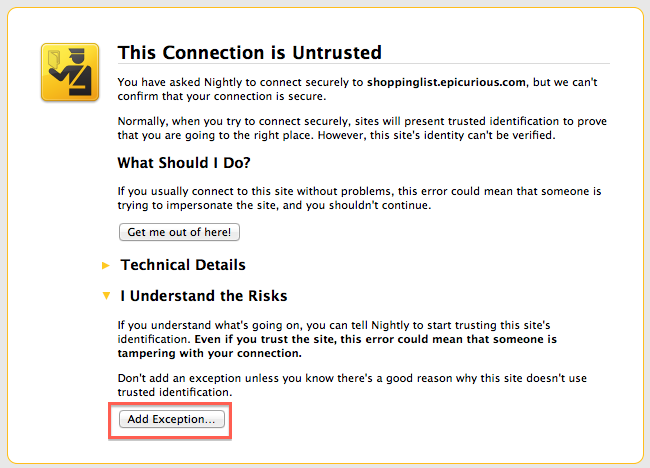
This Connection is Untrusted

I am using the Epicurious Clipper and have been for years. Now it's untrusted. I am using the latest software on an iMac. None of your forums have any answers relevant to a Mac, only Windows. Why is this happening all of a sudden?
Technical Details: shoppinglist.epicurious.com uses an invalid security certificate. The certificate is only valid for the following names:
*.ziplist.com , ziplist.com
(Error code: ssl_error_bad_cert_domain)
All Replies (5)

Hello,
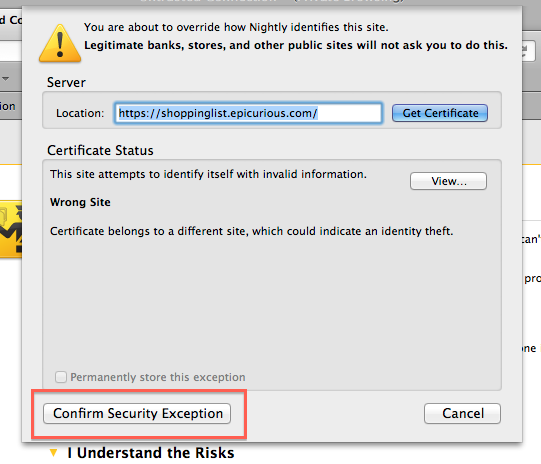
The problem here is that the SSL certificate is registered to ziplist.com, and not epicurious.com. This could be a security problem, so Firefox blocks it. However, if you trust ziplist.com you can add an exception and Firefox will allow you to go to the site.
See: https://support.mozilla.org/kb/secure-connection-failed-error-message#w_bypassing-the-warning for information on how to add an exception.
I have never felt too dumb on a computer but I can't find "add an exception" anywhere on the page. I am on an iMac. Thanks
Sorry, that page does need screenshots. I will respond again tomorrow when I can get on that site and take one for you.
Do you need to use a secure https connection or is it possible to use a normal http connection to that website?
"Clear the Cache":
- Firefox > Preferences > Advanced > Network > Cached Web Content: "Clear Now"
"Remove Cookies" from sites causing problems:
- Firefox > Preferences > Privacy > Cookies: "Show Cookies"
To add an exception, follow the steps in the screenshots.