


How to stop saved email address from writing from old account

I have just used a saved email address to write an email. When I went to send it the send failed because the from account was an old account I do not use anymore.
How do I change saved email addresses so they do not use the old account.
Why would this happen.
I checked which account I was using at the time and then repeated the process with the same result. I was using my current account.
Chosen Solution
Up near the top of this page there is a heading called TAGS
It shows the Windows and Thunderbird version my computer is using.
I finally found out how to fix the issue with a lot of messing around and trying things.
I thank you both, if only for prodding me into looking at different things. It appeared to me you seemed to think I was stupid but you had obviously missed the basic details I provided as nothing you provided made sense.
All Replies (14)
Please clarify what you mean by 'saved email address'? I am having trouble understanding the issue. thank you.
An email address from my Thunderbird Address Book.
But the FROM address comes from the sending account. If that account has not been removed, then that error will happen. I suggest you click 'account setting' from menu and scroll down left sidebar to see if the account is still listed.
I also suggest removing from your addressbook.
As my OP said I was using my current account inbox. The old account is still listed but has been disabled from sending. That is how I realised the "From" address was the old account address.
I was definitely using the correct account inbox, and as I said I repeated the process. Just did it a third time. The repeated times I just went to the address book entry and clicked on Write. The Write window came up with the "From" listed as my old account address at the top. I can see my new account address inbox listed on the Tab at the same time.
If I click on Write at the top of the Thunderbird window the correct address is listed but all addresses in the Address Book are providing the wrong "From" address including a very recent one which was only used with the new address.
Remove what from my address book? The old address? I have now done so. No change.
As long as the old account is still there, the possibility of this continuing is possible. Be sure that it is not set as default. My recommendation is to delete it. If you are keeping it because of old emails, I suggest creating a folder in Local Folders and copying them there so the account can be removed.
I was keeping the old account so I would still get messages from senders that haven't changed to my new address. That is probably not needed anymore. so I can delete the account as you suggest.
Oldneweng said
As my OP said I was using my current account inbox. The old account is still listed but has been disabled from sending.
No it has not. You can't do that.
I was definitely using the correct account inbox, and as I said I repeated the process. Just did it a third time. The repeated times I just went to the address book entry and clicked on Write. The Write window came up with the "From" listed as my old account address at the top. I can see my new account address inbox listed on the Tab at the same time.
Go to outgoing server (SMTP) is this "disabled account shown there? it must be to be used to send mail and you need to remove it from there.
If I click on Write at the top of the Thunderbird window the correct address is listed but all addresses in the Address Book are providing the wrong "From" address including a very recent one which was only used with the new address.
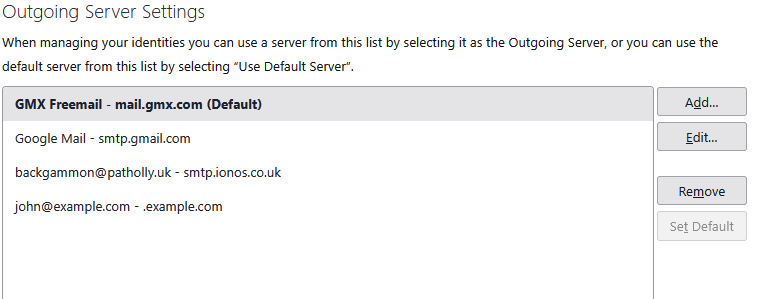
Thunderbird uses the "default" address from the outgoing server (SMTP) list of account to send mail if it is in any doubt as to which it should use. Have you checked what account you have set as "default"
Modified by Matt
"No it has not. You can't do that."
Ok, lets just say it is not able to login to the server and I cannot send or receive email from that address. I did something to cause this.
The old address is still set as default. I have not set it as default, it was just once the only address in Thunderbird. I have no idea how to set a default address. I cannot find any way to change this.
Both accounts are listed as Outgoing Server (SMTP)
Oldneweng said
The old address is still set as default. I have not set it as default, it was just once the only address in Thunderbird. I have no idea how to set a default address. I cannot find any way to change this. Both accounts are listed as Outgoing Server (SMTP)
Then select the address you want to be the default and select the "set default" buttom beside the list of outgoing servers.
Chosen Solution
Up near the top of this page there is a heading called TAGS
It shows the Windows and Thunderbird version my computer is using.
I finally found out how to fix the issue with a lot of messing around and trying things.
I thank you both, if only for prodding me into looking at different things. It appeared to me you seemed to think I was stupid but you had obviously missed the basic details I provided as nothing you provided made sense.
I must agree, nothing made any sense to me either.
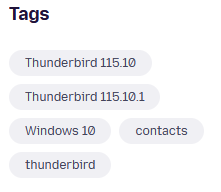
This shows an out of support version of Thunderbird on an obsolete and out of support operating system. I see no relevance at all to the default outgoing mail account or the discussion.
This is a summary of everything Thunderbird knows about sending mail from your computer. It is from my machine but the basic layout has not changed is decades.
So you have a solution and if was nothing provided here.
I finally found out how to fix the issue with a lot of messing around and trying things.
You were asking about the use of an outgoing server for an address selected from the address book so the outgoing account for an identity as shown in the following image would not be relevant as that is not a factor in selecting an address from the address book.
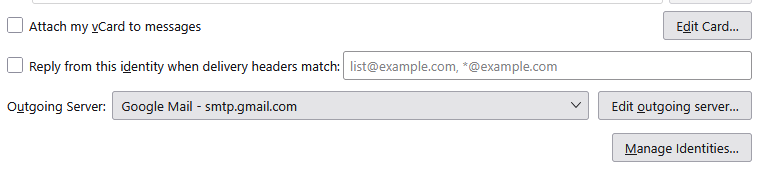
I at a loss to think of any other determining factor in what outgoing server is selected so would you please advise what the actual solution was? These topics form a database of issues and solutions and I at least have no idea what the solution to your issue was.
"I must agree, nothing made any sense to me either."
I did provide the versions and you should have seen this but I guess you made an assumption.
The solution involved setting the default server but this is done in the Account Settings/Account Actions (Bottom of list of Accounts on Left), select "Set As Default" and type the new default account name in the "Account Name" box, in the dialog that appears.