


I added two new email accounts to Thunderbird; they're working fine, except Search doesn't see them.
I added two new email accounts to my Thunderbird installation (140.12.1esr (64-bit) under Windows 10), and am able to receive and send mail just fine. But the T-bird Search utility doesn't work for those accounts. I can do a Search for an email address, subject, etc. that's showing on my screen for those accounts, but the Search utility comes up empty. Search does work for three other accounts, however. Any ideas?
All Replies (8)
Thanks for the tip, Matt. Rather than delete that .sql file, after closing Thunderbird I moved that file to my Desktop and renamed it, 'just in case,' figuring I could restore the old name and put it back should tragedy befall. I then restarted Thunderbird and gave it half an hour or so, but that file still has not been regenerated. Moreover, under Tools > Activity Manager, I get a box with some entries having to do with the program starting on recent occasions, but nothing currently going on. In case the file rebuilding is an extended process and just not communicating with Activity Manager, I'll take another look in a while and, if still no action, will restore the old .sql file and check the Search utility at least among the accounts it does work with. "I'll be Bach!"
UPDATE: Just for the heck of it, I tried using the Search utility in Thunderbird, even though the global-messages-db.sqlite file has been removed from Profiles. Search appears to still work with the three original Thunderbird accounts, but still not with the new ones. That .sqlite file has not been regenerated, so I'm wondering how Search is working at all, and whether I should put the old one back. Hmmm.
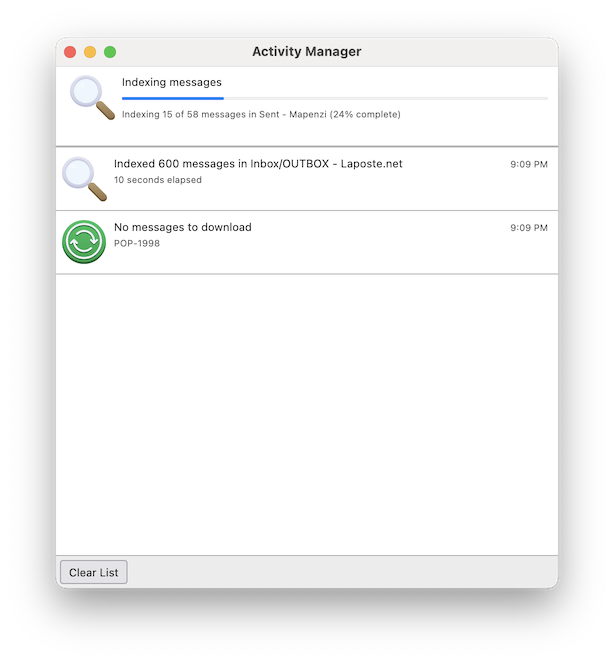
If you have very many folders and messages rebuilding the global data file might take several hours. I just tried to reproduce your issue in my YB 140.12.1esr profile: deleted the global-messages-db.sqlite file, started Thunderbird and immediately opened the Activity Manager to follow the progress. Since the index re-building stopped after a minute I tried a second time, and again the re-building stopped at the same message in one of my Sent folders (see image). It might be that the corresponding Sent file is damaged and that the re-building process cannot go any further.
Thanks for all you effort, Mapenzi, but I think I must have something else going on here. My (User) > AppData > Thunderbird > Profiles folder does not have that .sqlite file in it anymore. When I tried previously to rebuild the database, rather than delete that file, I moved it to my Desktop and renamed it like the attached icon. I assumed that this would make it unsearchable by Thunderbird. (?)
So that .sqlite file is gone from the Profile, but Thunderbird is not rebuilding it. When I look at the Activity Manager, all I see is notification of recent downloads, nothing about rebuilding a file. And it's been over 24 hours now, should have been done by now.
I have tried closing and restarting Thunderbird a couple or three times, any hints for what to try next? If you think completely deleting that renamed .sqlite file might help, I'd do it. Just saving it in case dumping it messed things up.
I don't think it's possible that there's a "parallel universe" situation here, where Thunderbird might have two profiles. I've looked in the usual places to no avail.

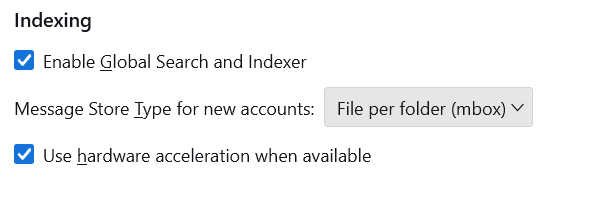
If Thunderbird doesn't rebuild the global-messages-db.sqlite file the reason might be that the global search and the indexer are disabled in your Thunderbird Settings: open Settings and scroll down to the bottom until you see "Indexing" and verify if a check mark is set before "Enable Global Search and Indexer"
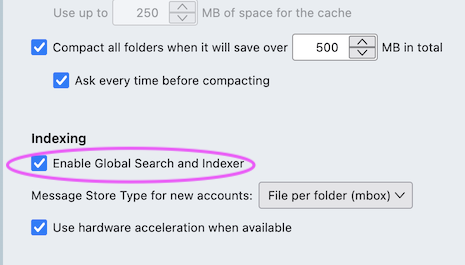
I'd looked at that checkbox previously, it's checked all right.
I have no explanation for the missing global-messages-db.sqlite You can still try to start Thunderbird in 'troubleshoot mode' and see whether this file will be rebuilt https://support.mozilla.org/en-US/kb/troubleshoot-mode-thunderbird