Open
I inadvertantly downloaded a browser extension and I'm concerned about my computer's security.

I needed access to an ftp server. I went to Cyberduck and thought I was downloading its software. Instead, I apparently clicked on an ad from that site instead. In the process, I had this bogus browser extension right next to my Facebook Container. ... I deleted it, but I'm still concerned about what I may have done/permissions I may have granted.
Please help!
I needed access to an ftp server. I went to Cyberduck and thought I was downloading its software. Instead, I apparently clicked on an ad from that site instead. In the process, I had this bogus browser extension right next to my Facebook Container. ... I deleted it, but I'm still concerned about what I may have done/permissions I may have granted.
Please help!
All Replies (1)

If you remember the name of the browser extension, you can search for it on https://addons.mozilla.org
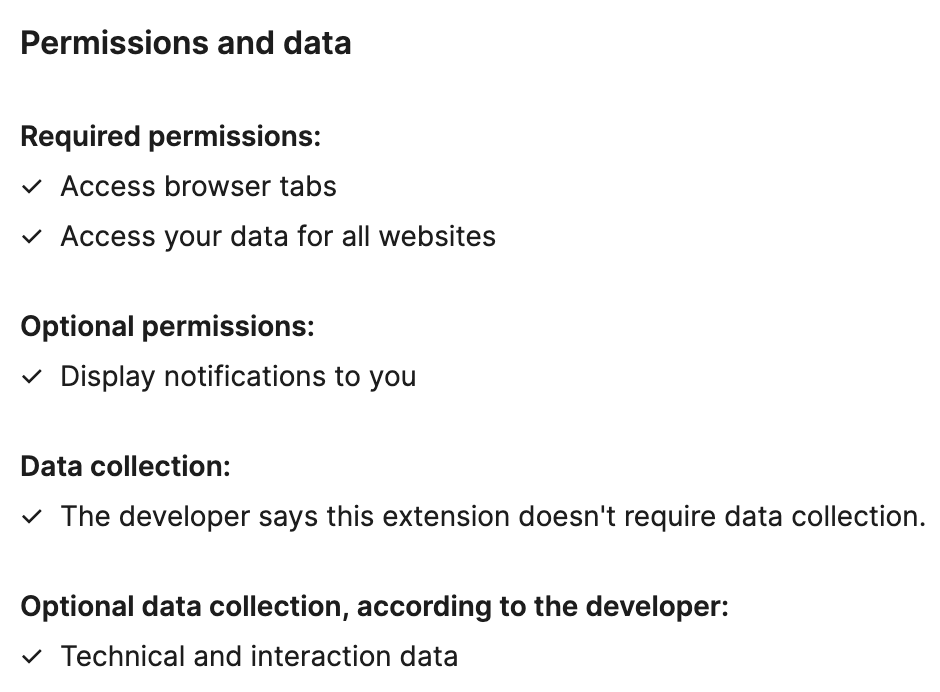
Under the Permissions and data section of a specific extension, there is a list of permissions that the extension requests for.
Screenshot of an example extension: