Why is my Drafts folder suddenly empty this morning?

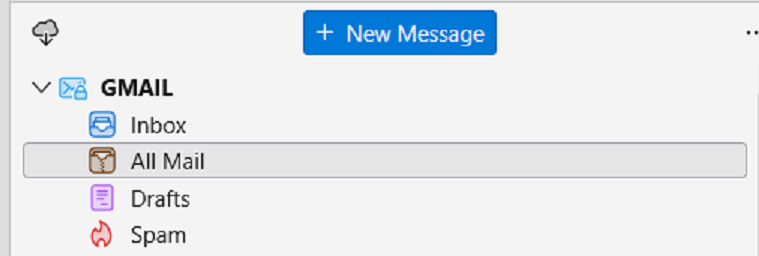
I opened Thunderbird this morning and my Drafts folder is empty. Not only that but when I am composing an email and hit Save, which is setup to save to Drafts folder, I get a little popup that says Copying message to drafts folder. I open Drafts folder and it is not there. However, this new message that I tried to safe to Drafts shows up in a folder named All Mail. I try to drag it to Drafts but it does not copy or move to Drafts. I created a new folder and named it Drafts 2 then copied this test message to Drafts 2. But where are my original Drafts folder contents> I have changed absolutely nothing in Thunderbird. No settings changes, no nothing. What the heck? I had important things in my Drafts folder and now they are gone.
Oh, this happens on my Primary Gmail account. I open Gmail in my browser, check Drafts and it's empty too.
I check my ISP furnished POP3 account and it has a message in Drafts. I create a new message, save it to drafts in this POP3 account and Thunderbird147 puts it there.
All Replies (2)
Just suggestions here that may (or may not) work:
- check to see name of Drafts folder that is in the subscribed listing for the account.
- check the 'copies&folders' pane to verify that the Drafts folder is the same as in the subscribed listing
- rightclick on the draft folder to verify that it has the same name in properties as in subscribed listing
- create a test message in draft to verify that the setting works.
Comment: all drafts will appear in Allmail.
Thank you. 1. Yes it is and it is empty 2. I don't know what you mean. I closed Thunderbird when I went to bed on the 23rd and all was as it has always been. No settings were changed by me. I opened Thunderbird on the morning of the 24th and it is empty. I don't know if the Drafts icon has always been like this but I notice that the folder Icon for the Drafts folder is different from the rest and it not the same as in the past. The Icon is now a pinkish color and looks like a text page instead of a yellow folder Icon. Screen shot enclosed. 3. Yes it is 4. I did and the test message did not go to the Drafts folder. A brief message appeared on screen when I clicked on Save and it said Copying message to drafts folder but it is not there. The folder is still empty. I login to Gmail online in my browser and click on the Drafts folder and it is empty. I create a test message in Gmail online in my browser, save to Drafts folder and it appears there in my Gmail online account. Afterwards I go to Thunderbird and the test message I saved in Gmail online in my browser appears in my Drafts folder in Thunderbird.
Draft messages composed in Thunderbird are not going to the Drafts folder. Draft messages composed in Gmail online are going to Drafts folder in Gmail online AND in Thunderbird. Screen shot enclosed. This is the test message created in Gmail online. As you can see it is the only thing in the folder. Everything else is gone.
What is happening to Drafts created in Thunderbird is the question.