


Folder "Deleted"

After one week my mails are vanished from the folder "deleted". How can I keep them there for a longer time?
All Replies (8)

Right-click on your Deleted folder > Properties > Retention Policy and verify whether there is a setting to delete messages after one week. Another possibility: if your account is IMAP and if you use the same IMAP account on a smartphone email client there might be a setting to delete messages from Trash after a week. Or your email provider has a setting to delete Trash messages after a week. Verify on web mail.
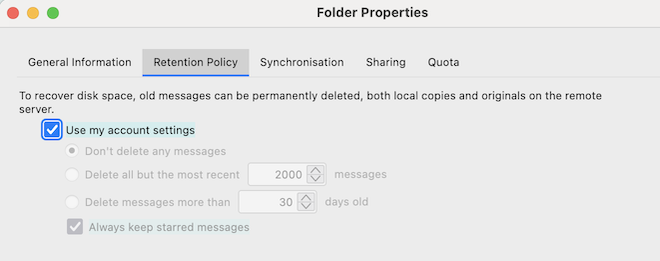
Thanks for the hints. In the deleted folder was on "Don't delete any messages" and "Always keep starred messages". This last point I turned into "off" now. On the smartphone was no setting to delete messages. At GMX neither.
Frankly I don't know the answer. Still one idea: go to Account Settings > account name > Server Settings > Message Storage and verify that the box "Empty Deleted folder on Exit" is unchecked.
Thank you so much. The box you told me was unchecked. In the Server settings at "When I delete a message move it to this folder" bevore was signed "Deleted", I changed it now to "Gelöscht" - and now the item "Deleted" is no more shown up, strange.
Let's see what is going on now.
Have a nice week, thank you
I have never seen a folder "Gelöscht" in a German Thunderbird version. By default the German term for "Trash" or "Deleted" is Papierkorb.
Before in this account I had "Papierkorb" and two times "Gelöscht", now there is only onte time "Gelöscht" in the drop-down-menu and "Papierkorb" is vanished. In another accout there is "Papierkorb" and "Gelöscht", in a third account only "Papierkorb". In this third accout are still the mails from the 4th of february until today. Where I did the change from "Papierkorb" to "Gelöscht" are left only the ones of today.
In spite of all, thank you very much! I learned now, that it's not a simple problem. Maybe I have to deinstall the program.