


Thunderbird 145 & 147 - frequent errors connecting to server "outlook..."

This just started 4 or 5 days ago ( 2026.1.23 ish). I did not update TB nor make any changes to the account in question (that I'm aware of). The errors show up every few minutes, with a 'beep' sound and notification pop-up showing up each time - is very annoying.
I was running v145 when it started. I saw there was an update to 147 and installed that; same issue. I restarted TB into Troubleshooting mode and am still getting the error.
This is running on MacOS 15.7.3. Hardware is MacMini (2024) with Apple M4 chip.
Generally I still seem able to received & send emails.
I opened Activity Manager and Error Console. Error console doesn't seem to have much (using 'Multiprocess', with Errors, Warnings, Logs, Debug enabled). Activity manager shows things such as:
<my account name>
   Connection to server outlook.office365.com was interrupted.    09:49
   Failed to connect to server outlook.office365.com.    09:52
   Authentication failure while connecting to server outlook.office365.com.    09:58
   Authentication failure while connecting to server outlook.office365.com.    10:03
   Connection to server outlook.office365.com was interrupted.    10:10
   Connection to server outlook.office365.com was interrupted.    10:14
   Connection to server outlook.office365.com was interrupted.    10:20
There was an error or log entry that I was able to find a few days ago that made me think it was Calendar related, but now I'm not finding that message.
All Replies (2)
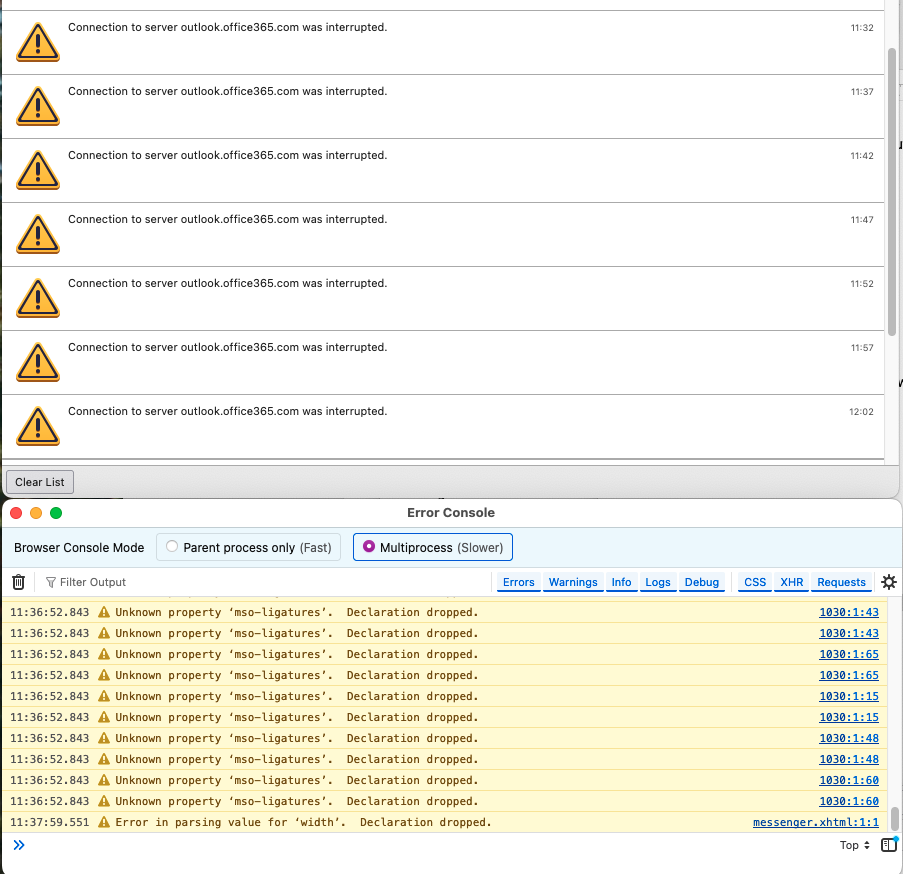
BTW - this is an account using the newer EWS setup in recent TB versions. I used to use IMAP for this account, but switched to using EWS once that was available.
But this EWS account was not throwing all of these errors right from the start - it seemed to work pretty well, no errors (that I was aware of) for a few months (or from whenever it was released) until about 2026.1.25. Then the errors started cropping up.
It is possible that the errors have always been happening, but they just started showing up as notifications each time they happen. Which is every 5 minutes... I get a <ding> and a notification... it's highly annoying and I'm about to switch to another program. :(
I created a new Profile to see if that would help... set it up with the same MS365 account and connected it using the EWS option. So far... so good?! I saw one entry for the 'connection interrupted' error in the Activity Manager window when I first opened it (the Activity Manager); I cleared and haven't seen the error since. Has been about 30 minutes now... DOH! It just happened! :(
So might be something in my older profile... at least, the periodicity changed in this new profile, from 5 minutes to 30. I went through and looked at various settings and I don't believe that I have anything configure to check every 30 minutes. New email check is at 5 minutes. I thought I might have a path forward to a fix, by making a new profile... but maybe not.