


Mailing lists
I created a Mailing List within an Address Book a year ago. I now need to add some new contacts to the Mailing List . I added the new contacts but could only add them to the Address Book. I now need to copy them from the Address Book to the Mailing List, but can't see how to do so , there seems to be no way to view the two lists side-by-side.
Chosen solution
In the attached picture, the address book is expanded to show the lists. Select contacts in the address book, on the right, add them to a list by drag and drop.
Read this answer in context 👍 0All Replies (9)
Select the contacts in the right pane of the address book, then drag them onto the mailing list icon in the left pane, and drop them there.
Chosen Solution
In the attached picture, the address book is expanded to show the lists. Select contacts in the address book, on the right, add them to a list by drag and drop.
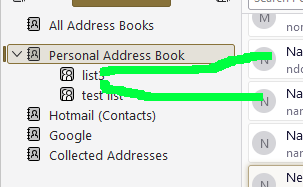
You still don't explain how to view both the the Address Book and the Mailing List together.
It's a bit awkward, but if you right-click the Address Book tab, Move to New Window, you can show two windows, one with the address book selected, the other with the list selected (see picture).
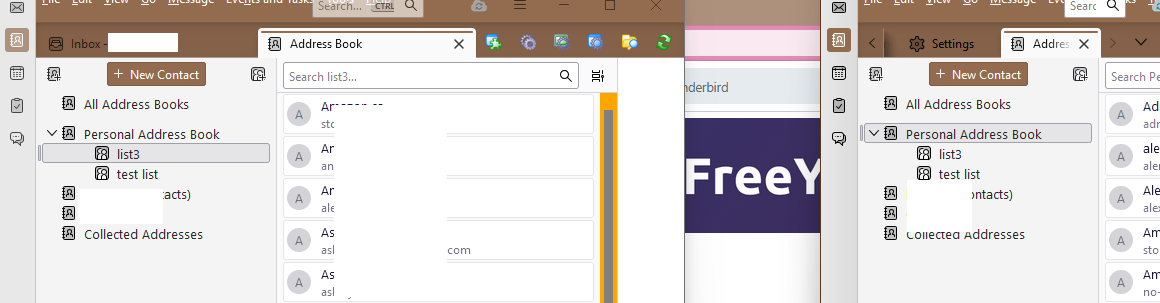
Sorry, neither Drag & Drop nor using Ctrl C+ Ctrl V works across windows. I can't believe this is so difficult - surely adding new contacts to a Mailing List is something lots of people need to do?
The 2nd method I offered is for viewing only. Use the method in my first reply to add to lists.
https://support.mozilla.org/en-US/kb/how-create-and-use-mailing-lists-thunderbird
I do apologise, I didn't fully understand your first reply, and was so sure I needed to see both lists in order to drag & drop the contacts. Having re-read it and followed it I have now updated my mailing list. My only excuse is that there are so many changes following upgrading to Windows 11 and the latest version of Thunderbird which are not intuitive, and I find myself getting out of my depth. Thank you for your patience, Diana

I get it now. Finally. A Mailing List exists within an Address Book To add to the Mailing List you can only use the drag and drop from the parent Address Book. If you want to create a new mailing list with names from different address books then;
   1. Create a new Address Book; NewAddressBook
   2. Create a Mailing List within NewAddressBook; NewMailList.
   3. Go to All Address Books and drag and drop into NewAddressBook.
   4. Go to NewAddressBook.
   5. Drag and drop from NewAddressBook to NewMailList.
Dammit. No, that doesn;t work either. Go to All Address Books and drag and drop into NewAddressBook means each each drag and drop overwrites the previous so you only end up with only the last entry.
Modified by rhodelta