

This thread was archived.
Please ask a new question if you need help.

Archived
How can I make Thunderbird display message info in a compact format?

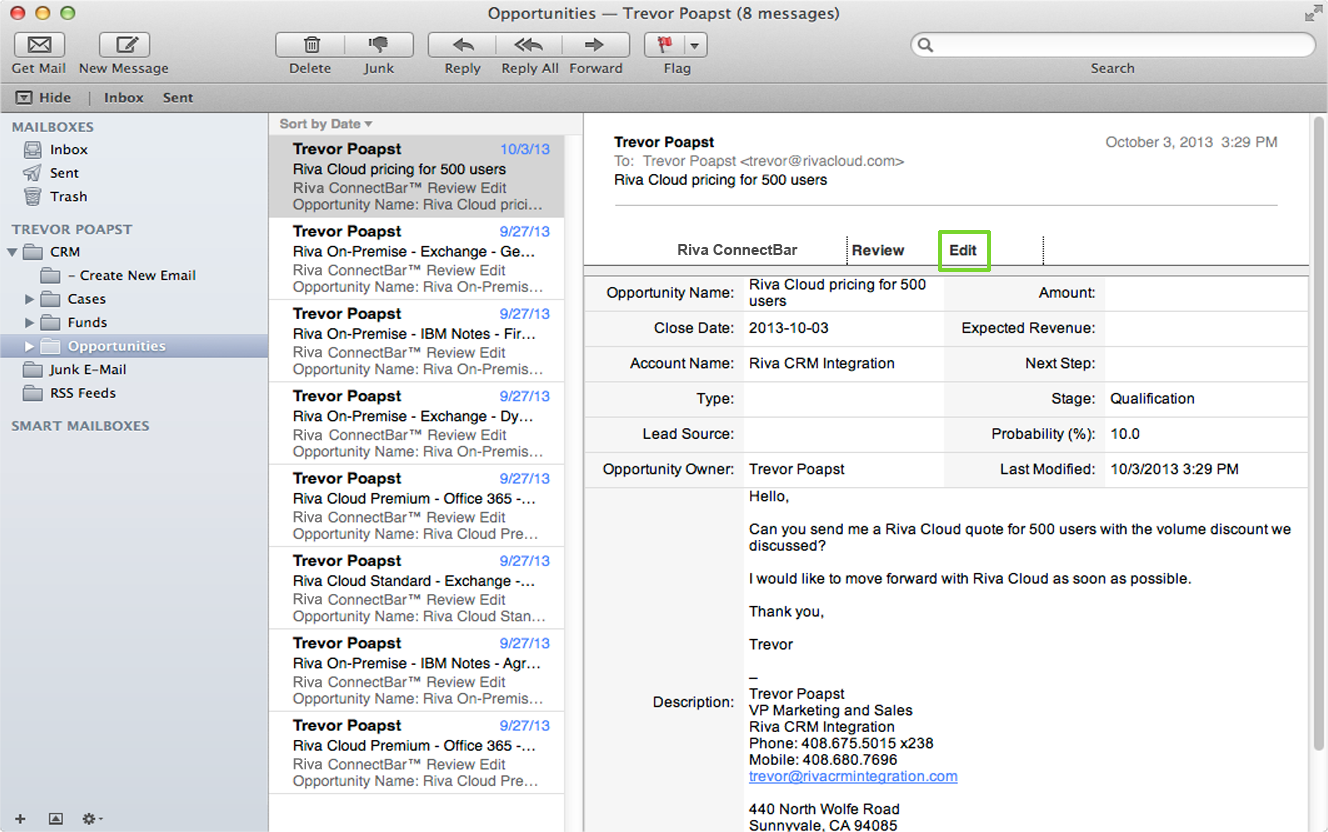
In Apple's desktop email client (called Mail), the part that shows basic information about the email like sender, subject and date is set up to take up less space than the one in Thunderbird. The section I'm talking about is to the left of the message page. The sender, subject and the first two lines of the message are displayed in separate rows instead of separate columns. The advantage to this approach is that it allows the message pane to be larger. I've attached a generic Apple screenshot so you can see what I'm talking about. Is it possible to make Thunderbird do this? How?
In Apple's desktop email client (called Mail), the part that shows basic information about the email like sender, subject and date is set up to take up less space than the one in Thunderbird. The section I'm talking about is to the left of the message page. The sender, subject and the first two lines of the message are displayed in separate rows instead of separate columns. The advantage to this approach is that it allows the message pane to be larger. I've attached a generic Apple screenshot so you can see what I'm talking about. Is it possible to make Thunderbird do this? How?
All Replies (1)
there is not