


i am upset.

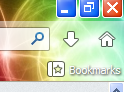
when i installed a program, it does these **** offers (install xxx toolbar) and one had no deny button to terms of service. and it RESET MY BROWSER SETTINGS. and, how do i get rid of this button that drives me OVERLY INSANE http://i1068.photobucket.com/albums/u443/polobob1/Screenshot_4-2_zpsd07a450c.png. how do i get rid of the ***** new tab screen? ......
Edited by a moderator due to language. See the Rules & Guidelines .
Modified by the-edmeister
All Replies (4)
well i got those problems fixed. now tell me how to lock settings.

Don't know about locking, but one thing you can do is to make a backup copy and put it in a safe place. As to those unwanted load ups, most of then do have an op-out or no thanks button, but you need a magnifying glass to see them.
I don't understand what you mean. I'm seeing nothing unusual in the screenshot that you posted above.
Which button do you mean in that screenshot?
There is the new Download Manager toolbar button and the Home button on the Navigation Toolbar and the Bookmarks Menu button on the Bookmarks Toolbar that I see.
Can you clarify what was wrong?
how do i do that