


Open
Calendar event description is hardly visible - black font on dark grey background. Default Theme issue

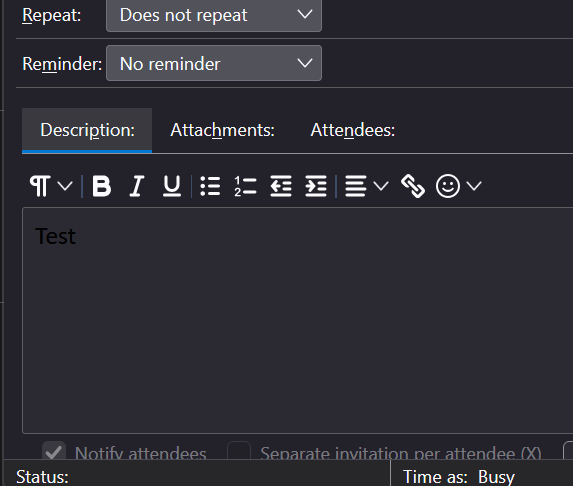
After 158.0.1 update the colors are broken when I open a calendar event (in a popup or tab) in edit mode the description has dark background with black font which is very hard to read. I have Dark Mode in windows and this issue is in both Auto and Dark themes in Thunderbird. No matter what theme I install apart from Light the description in unreadable.
After 158.0.1 update the colors are broken when I open a calendar event (in a popup or tab) in edit mode the description has dark background with black font which is very hard to read. I have Dark Mode in windows and this issue is in both Auto and Dark themes in Thunderbird. No matter what theme I install apart from Light the description in unreadable.
All Replies (1)
This is caused by the bug https://bugzilla.mozilla.org/show_bug.cgi?id=2077553 Until this bug will be fixed in a future update you can use a temporary workaround via a CSS code in a userChrome.css file which is described in this discussion https://support.mozilla.org/en-US/questions/1609243