


Thunderbird reinstall, cannot connect to recent profile. Appears to have installed in two locations.

Hi, hoping someone could help as I am struggling to get my information back. I am using Ubuntu Cinnamon.
Thunderbird crashed last night, wouldn't work, tried safe mode. Nothing fixed it. It hung when opening up and after 30 seconds said force quit. So I was forced to reinstall. I did a manual backup but not using the inbuilt tool as I couldn't get into Thunderbird. I just copied the data from username/.thunderbird
After spending a long time uninstalling. Because it reached 78% and then crashed on uninstall. Eventually after reading various pages on the internet I managed to reinstall from the Ubuntu software manager using the latest snap version. (Which I am not sure was what was actually installed previously).
However having used thunderbird for nearly 20 years or so. I have a username/.thunderbird folder. And when I moved to this platform, I have a snap/thunderbird/common/.thunderbird folder.
I installed this new distro 2 years ago, and remember having issues getting my data into the system under Snap. But eventually got it to work somehow back then.
However since reinstalling I cannot see the last 2 years of emails, archives or data. It has launched into a 2 year old profile. I appear to have lost most of the emails from the archive folders (but kept the folders) removed all of the personal folders but then dumped all those emails into my inbox. Giving me 6500 emails that were in various personal folders. (I don't get 6500 emails in a year so don't know what has happened.) It has even changed all of the new dates to the US format, so nothing makes any sense.
I now have 2 Thunderbird profiles, over 12GB in size. And have apparently lost 2 years of my life. But reading support pages, suggests I should be okay because thunderbird doesn't delete data when you reinstall?
I have looked through various other threads which talk about pointing it at the profiles and mail boxes, however nothing works.
Any help much needed.
All Replies (26)
First, I am not a linux guru, but I am aware that different distributions install in different locations. Are you wanting to use one of the profiles? Or are you wanting to merge two profiles? Knowing that may help get the help you want.
david said
First, I am not a linux guru, but I am aware that different distributions install in different locations. Are you wanting to use one of the profiles? Or are you wanting to merge two profiles? Knowing that may help get the help you want.
I just want to access either profile that works. Historically the username/.thunderbird is the one that I have brought across from previous versions of Linux (I had mint before this one.). I didn't know about snap being a different until I installed thunderbird and then somehow I got it to work 2 years ago. Either importing or bringing it in by pointing the profile perhaps?
Ideally I don't care which one works. I just need my emails back to be honest. It appears that despite using it daily, thunderbird just hasn't been saving anything for two years. Which I know isn't true. So I assume lost in the config or folder there is something I am missing to make it find the information.
Okay, since the active profile is not the one you want, try these steps:
- click help>troubleshootinginformation
- scroll to 'profile folder' and click 'open folde'r
- exit thunderbird
- you should now be in the profile. You can confirm that as you should see a listing of files, one of which would be abook.sqlite. DELETE everything here
- now open one of your saved profile folders, Here also, you should see the abook.sqlite file there.. That confirms that you have opened a valid profile.
- next, copy ALL of the profile and paste it into the active profile that you just emptied
- if there is a compatibility.ini file, delete it.
- restart thunderbird and it should start successfully if the profile is not corrupt.
david said
Okay, since the active profile is not the one you want, try these steps:
- click help>troubleshootinginformation
- scroll to 'profile folder' and click 'open folde'r
- exit thunderbird
- you should now be in the profile. You can confirm that as you should see a listing of files, one of which would be abook.sqlite. DELETE everything here
- now open one of your saved profile folders, Here also, you should see the abook.sqlite file there.. That confirms that you have opened a valid profile.
- next, copy ALL of the profile and paste it into the active profile that you just emptied
- if there is a compatibility.ini file, delete it.
- restart thunderbird and it should start successfully if the profile is not corrupt.
Hi, To clarify. DELETE everything here. Do you mean everything in that folder, including the abook.sqlite and all files and subfolders?
Yes, everything. This is not the profile you want and you need to replace everything. If unsure, then copy the contents elsewhere first.
david said
Yes, everything. This is not the profile you want and you need to replace everything. If unsure, then copy the contents elsewhere first.
Sadly that didn't work.
I did figure out that deleting the username/.thunderbird, also deletes the snap/common version. So I only have 1 x 12 GB of data I can't seem to access and that is dated 2 years old.
Any other thoughts?
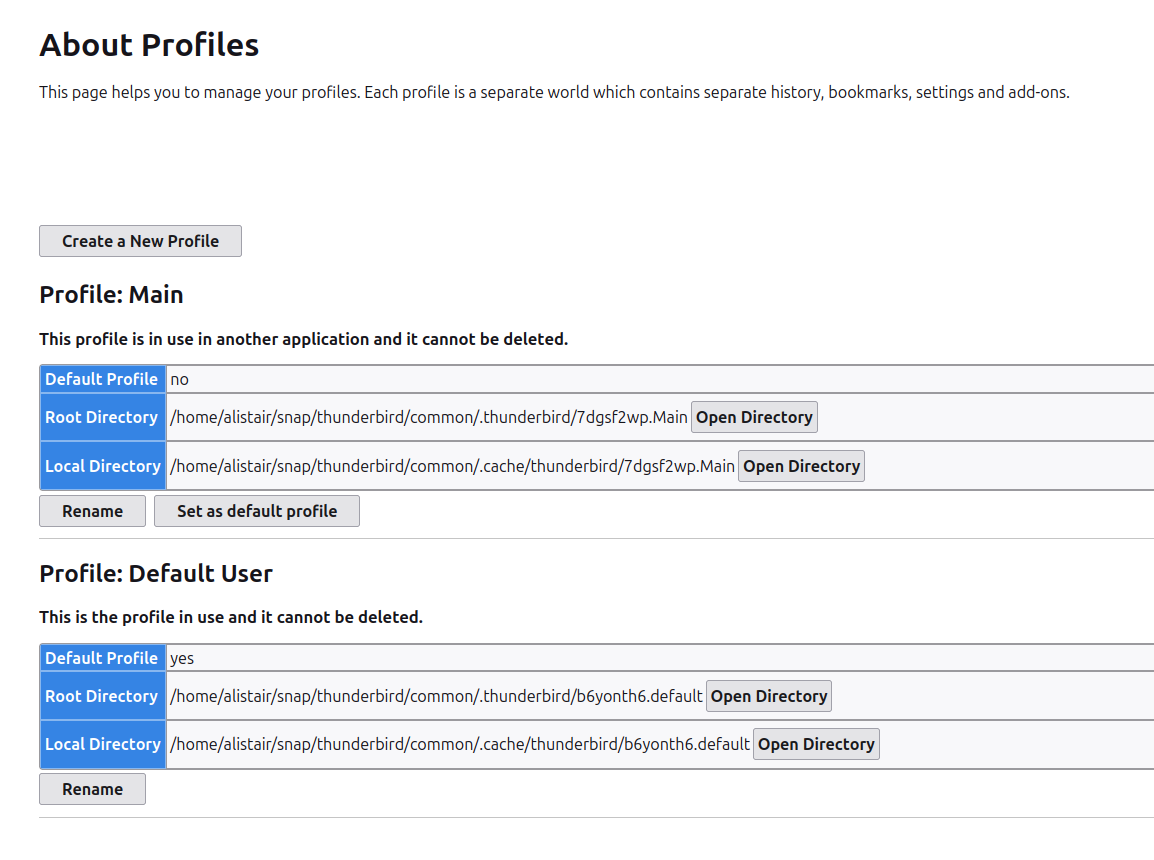
Looking in troubleshooting help I saw that I have a .main profile and a default profile.
It may help to explain what didn't work. There were 8 steps. Did one of the fail? Or did you get through them and have error restarting? If so, what was the error message?
david said
It may help to explain what didn't work. There were 8 steps. Did one of the fail? Or did you get through them and have error restarting? If so, what was the error message?
My apologies, that would have been helpful.
I got through all of it and it came out exactly the same. So I had the same 2024 dated emails and nothing recent. I am hoping that it is pulling information from another place or another profiled?
That indicates we were working with the wrong profile. Try this:
- locate each potential profile
- review the imapmail folder for IMAP accounts and the Mail folder for POP.. Look for the size of the folders in each to see where the big ones are. That should indicate where the missing messages are. If unsure post screenshots of the folders.
david said
That indicates we were working with the wrong profile. Try this:
- locate each potential profile
- review the imapmail folder for IMAP accounts and the Mail folder for POP.. Look for the size of the folders in each to see where the big ones are. That should indicate where the missing messages are. If unsure post screenshots of the folders.
Hi. I have a number of profiles shown in the screen shot. The only one that has a 'Mail' folder is the B6yonth6.default.
I have screenshotted the mail folders and attached. At this stage I am only bothered about the yahoo emails as the others don't bother me.
Local folders is 8.4GB mail.yahoo.com is 9.3kb pop.mail.yahoo.co.uk is 552.9MB pop.mail.yahoo.com is 186.2 MB pop.mail.yahoo-1.com is 15.3kb pop.mail.yahoo-2.com is 1.1GB
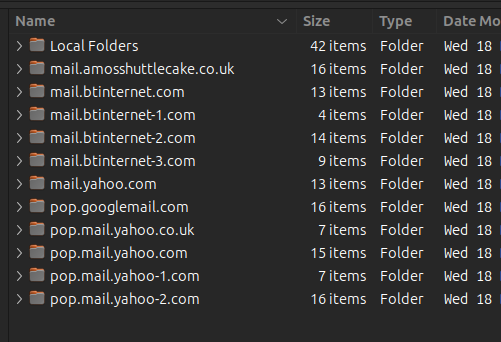
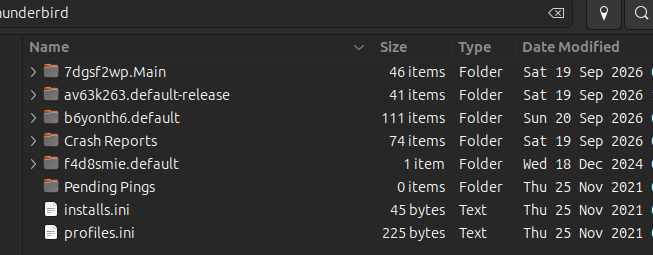
To assist, be specific on what is missing from the yahoo accounts. Screenshots of the contents of each of the four would be helpful so we see what you are seeing.
david said
To assist, be specific on what is missing from the yahoo accounts. Screenshots of the contents of each of the four would be helpful so we see what you are seeing.
What is missing is anything dated after December 2024. Which is when I installed Thunderbird on the machine with the new Distro. Essentially just under 2 years of emails have been wiped out.
How do you mean screenshots of all four? Not sure what you mean?
david said
To assist, be specific on what is missing from the yahoo accounts. Screenshots of the contents of each of the four would be helpful so we see what you are seeing.
I have also lost personal folders that had emails stored where I had filed them. Like holidays emails, Amazon etc.
And my archive folders are nearly all empty. So I have 2015. But all the others from 2007 have gone. The archive folders remain but the emails from inside them have gone. however the inbox has 2024.
With it being PoP there is no record on the yahoo servers. For example my night class starts tomorrow, I had emails with the class times and Zoom links which I can't get back.
Its 20 years of my life in terms of all emails and memories has been removed. And the backup has done nothing. But I have somehow kept 2024.
Okay, we're volunteers and may not solve your issue, but sometimes it helps to see the files themselves in Windows File Explorer. And, Thunderbird saves messages in the mbox format. That means, from a windows crash perspective, the folder is either destroyed or it's not. Thunderbird does not cut off files on an annual basis. So, if all is missing beyond 2024, then I wonder if those lost messages are in separate folders from those that are still in 2024. Unfortunately for POP accounts, the only protection from crashes is to backup after every message download, and daily at a minimum.
david said
Okay, we're volunteers and may not solve your issue, but sometimes it helps to see the files themselves in Windows File Explorer. And, Thunderbird saves messages in the mbox format. That means, from a windows crash perspective, the folder is either destroyed or it's not. Thunderbird does not cut off files on an annual basis. So, if all is missing beyond 2024, then I wonder if those lost messages are in separate folders from those that are still in 2024. Unfortunately for POP accounts, the only protection from crashes is to backup after every message download, and daily at a minimum.
I have gone through the various folders and screenshotted the ones that are not empty in the yahoo named folders. I did find a SQLite that sits at 1.1GB but other than that the main bulk of the data is in my archives. Which isn't what you see in Thunderbird. Because they have memory size when looking at folder view, but are empty when looked at. And they don't go over 2024. So I have lost the 2025 archive completely.
It is like a separate installation folder exists somewhere and that holds everything since I installed it on this machine.

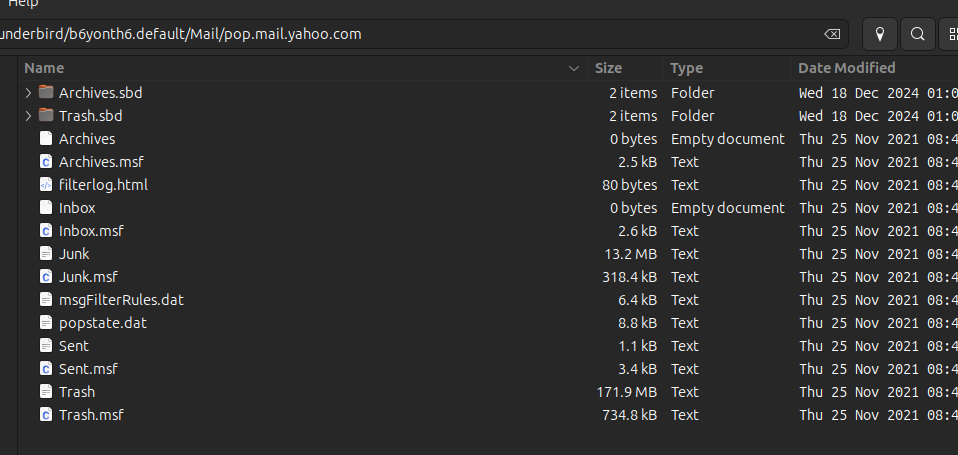
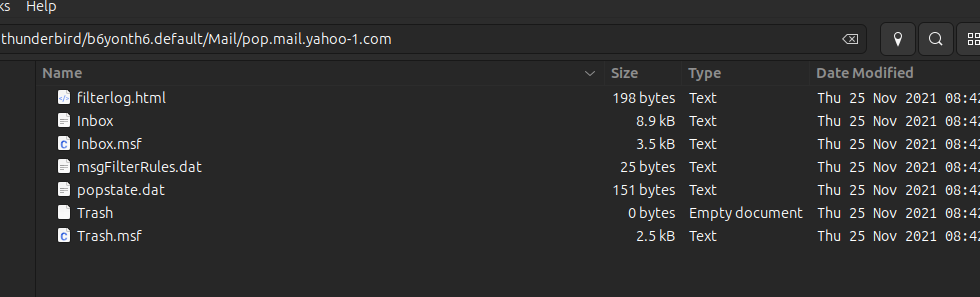
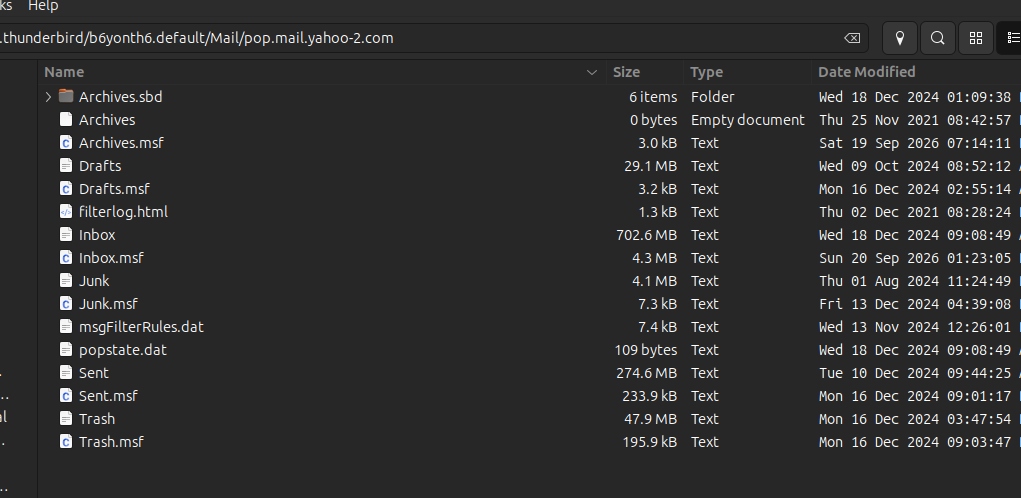
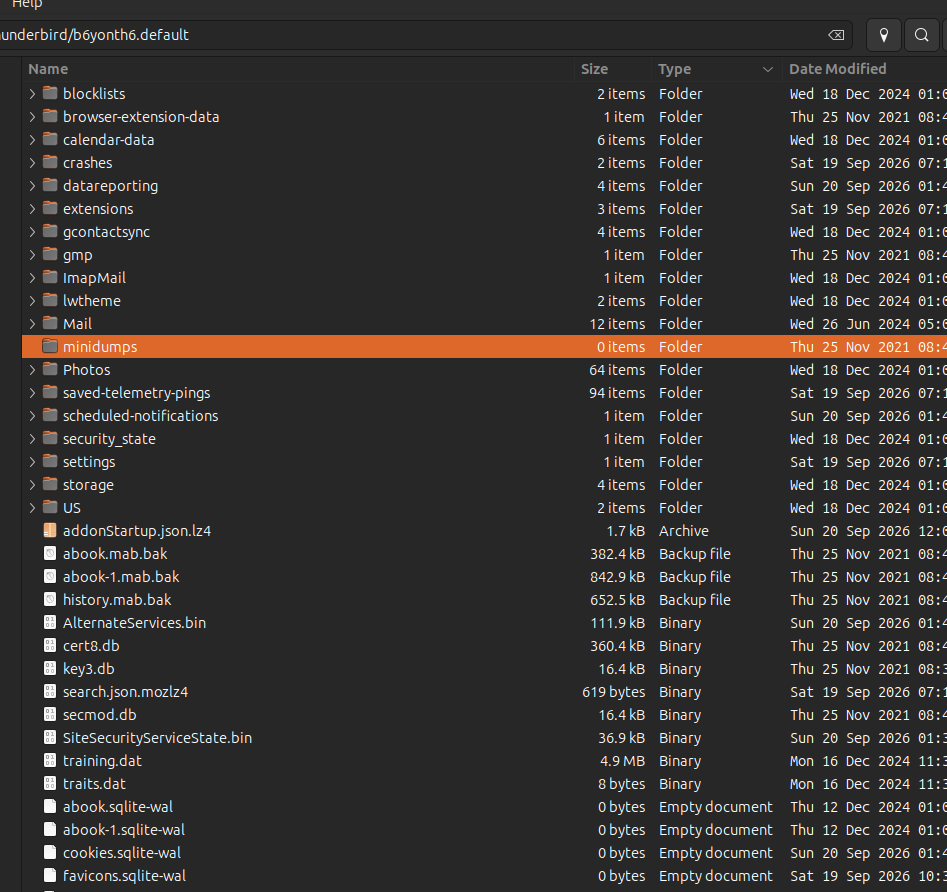
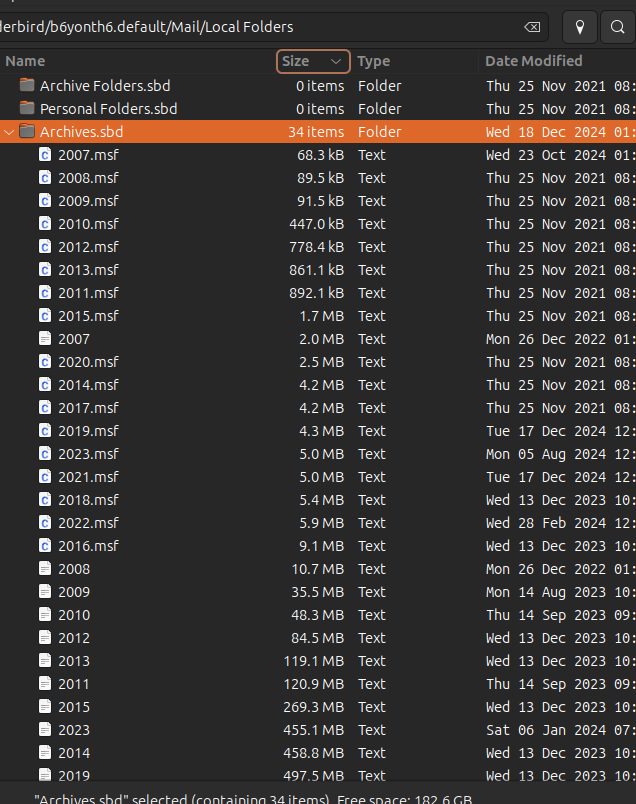
Well, I wish I knew Linux better, but this does seem wrong, I agree. I will see if I can locate someone else who might have ideas.
The folder that contains everything to do with your thunderbird profiles is called .thunderbird
Where that folder is depends upon where you got the Thunderbird program. If you got a download from the official Thunderbird download webpage and made sure it was for a Linux OS. https://www.thunderbird.net/en-US/thunderbird/all/
then Thunderbird would create your profile in this location : ~/username/.thunderbird folder.
If you used snap to get Thunderbird then it would get auto created in this location: ~/snap/thunderbird/common/.thunderbird
So, if you previously used the former and then changed to using snap, then you would have copied the .thunderbird folder from here ~/username/.thunderbird
Accessed the new one here: ~/snap/thunderbird/common/.thunderbird deleted that .thunderbird folder and pasted the copied .thunderbird folder into the ~/snap/thunderbird/common folder
I'm offering that information to ensure you understand, no matter where you got the download from, it is always the .thunderbird folder that you need to copy and replace.
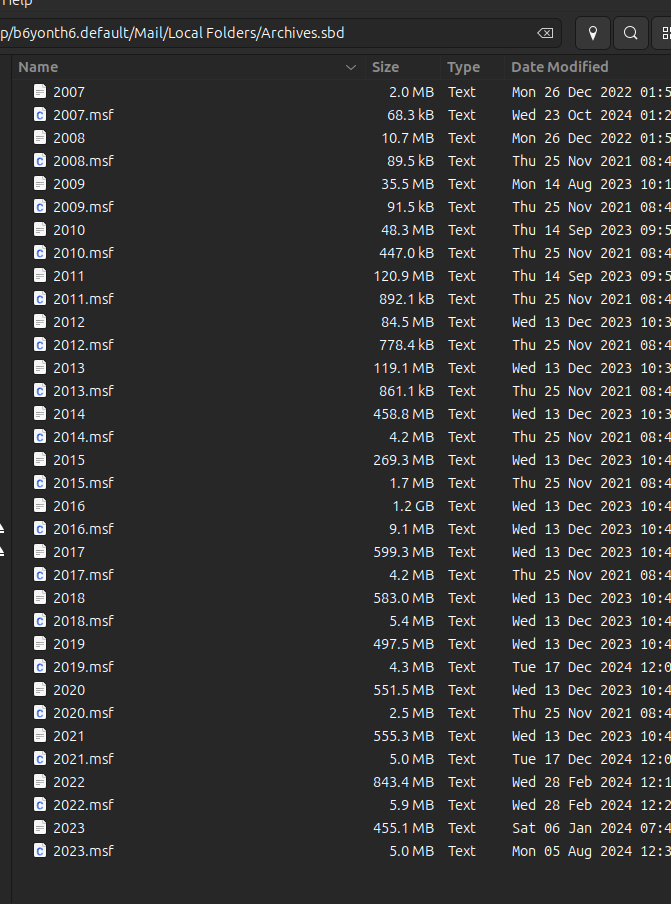
It looks like the B6yonth6.default profile contains: 'Local Folders' > 'Archives.sbd' and it contains up to 2023
I presume you can see all those archived emails in the 'Local Folders' mail account. Please say otherwise if not the case.
Looking at the list of other 'POP' accounts, it's not clear how many Yahoo accounts you actually have or whether you have been recreating identical yahoo pop accounts.
mail.yahoo.com is 9.3kb pop.mail.yahoo.co.uk is 552.9MB pop.mail.yahoo.com is 186.2 MB pop.mail.yahoo-1.com is 15.3kb
pop.mail.yahoo-2.com is 1.1GB is the largest - I'm assuming it's the main one due to the size. It contains an Archives.sbd folder with 6 items and that suggests 3 years, but you have not provided any image showing what is in that 'Archives.sbd' folder. We also do not know if you are actually using it.
In Thunderbird
- Account Settings > Server Settings for the Yahoo account
- In Left Pane - Select the name of the yahoo account
- Look bottom right for 'Local Directory:'
- Make window wide enough to see all the text data - where is it pointing to ?
- Upload an image showing all the contents.
- I would suggest you need to point to :
- ~/snap/thunderbird/common/.thunderbird/B6yonth6.default/Mail/pop.mail.yahoo-2.com
So if it's not pointing to that location then click on 'Browse' and select that specific pop account folder.
Toad-Hall said
It looks like the B6yonth6.default profile contains: 'Local Folders' > 'Archives.sbd' and it contains up to 2023 I presume you can see all those archived emails in the 'Local Folders' mail account. Please say otherwise if not the case. Looking at the list of other 'POP' accounts, it's not clear how many Yahoo accounts you actually have or whether you have been recreating identical yahoo pop accounts. mail.yahoo.com is 9.3kb pop.mail.yahoo.co.uk is 552.9MB pop.mail.yahoo.com is 186.2 MB pop.mail.yahoo-1.com is 15.3kb pop.mail.yahoo-2.com is 1.1GB is the largest - I'm assuming it's the main one due to the size. It contains an Archives.sbd folder with 6 items and that suggests 3 years, but you have not provided any image showing what is in that 'Archives.sbd' folder. We also do not know if you are actually using it. In Thunderbird
- Account Settings > Server Settings for the Yahoo account
- In Left Pane - Select the name of the yahoo account
- Look bottom right for 'Local Directory:'
- Make window wide enough to see all the text data - where is it pointing to ?
- Upload an image showing all the contents.
So if it's not pointing to that location then click on 'Browse' and select that specific pop account folder.
- I would suggest you need to point to :
- ~/snap/thunderbird/common/.thunderbird/B6yonth6.default/Mail/pop.mail.yahoo-2.com
Hi, Thankyou for helping.
I downloaded this version from the software manager in the Linux distro.
All the other Yahoo accounts I am not sure where they came from. They have existed in my back folder from years of keeping back up copies.
Changing to the snap local directory as you directed and it asks for a restart of Thunderbird and then restarts. Changing the local directory to the attachment. /run/user/1000 etc.
The contents of the inbox are still only current upto 2024.
I have attached the Archives.SBD from the yahoo mail folder. However I don't use them as I have a habit of accidently archiving emails and never bothered clearing the folders.
The archives I use are (or were) in the local folders archives. I used local because I used thunderbird to look after 3 email addresses, a googlemail and my own domain. So archiving all three addresses in one folder.
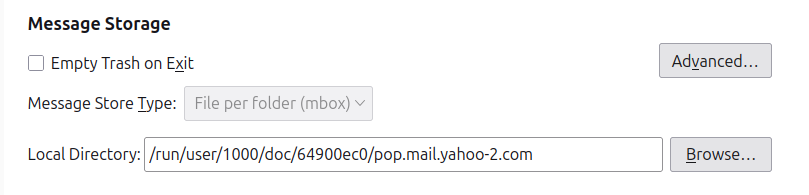
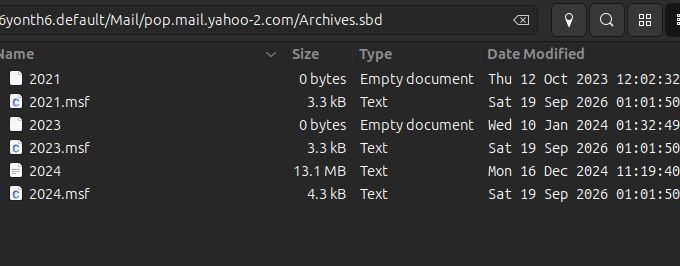
If you changed the account 'Local Directory' to say: ~/snap/thunderbird/common/.thunderbird/B6yonth6.default/Mail/pop.mail.yahoo-2.com
Then it should have an Archives folder that contains 2021,2023 (both empty) and 2024 with some emails. It should be pointing to that location because that is the default profile.
In Account Settings Select 'Local Folders' Look bottom right for Local Directory and confirm it points to:
- home/alistair/snap/thunderbird/common/.thunderbird/B6yonth6.default/Mail/Local Folders
Just so we know it is pointing to the correct location.
If you have both the account and the Local Folders pointing to correct location that is good.
Now to try and track down where any missing emails are lurking.
You mention you always like to keep archived emails in the 'Local Folders' - so What do you see in :
- home/alistair/snap/thunderbird/common/.thunderbird/7dgsf2wp.Main/Mail/Local Folders
Post an image showing all contents of that 'Local Folders' folder.
In the beginning you mentioned :I just copied the data from username/.thunderbird
Perhaps it would be useful to know what is in that location. Access your copied username/.thunderbird' folder Post image showing contents so we can names of profiles.
check each profilename/Mail/Local Folders folder Do you see any mention of 'Archives' and Archives.sbd' folders ? Do any contain dates of missing years and do they contain emails? Post an image of any containing the missing files and folders.
re :I appear to have lost most of the emails from the archive folders (but kept the folders) removed all of the personal folders but then dumped all those emails into my inbox. Giving me 6500 emails that were in various personal folders. (I don't get 6500 emails in a year so don't know what has happened.)
Can you confirm that the Inbox emails are not any you would have archived ? The Inbox emails are only emails you would sort into personal created folders.