


Unsent Message Folder in Wrong Place

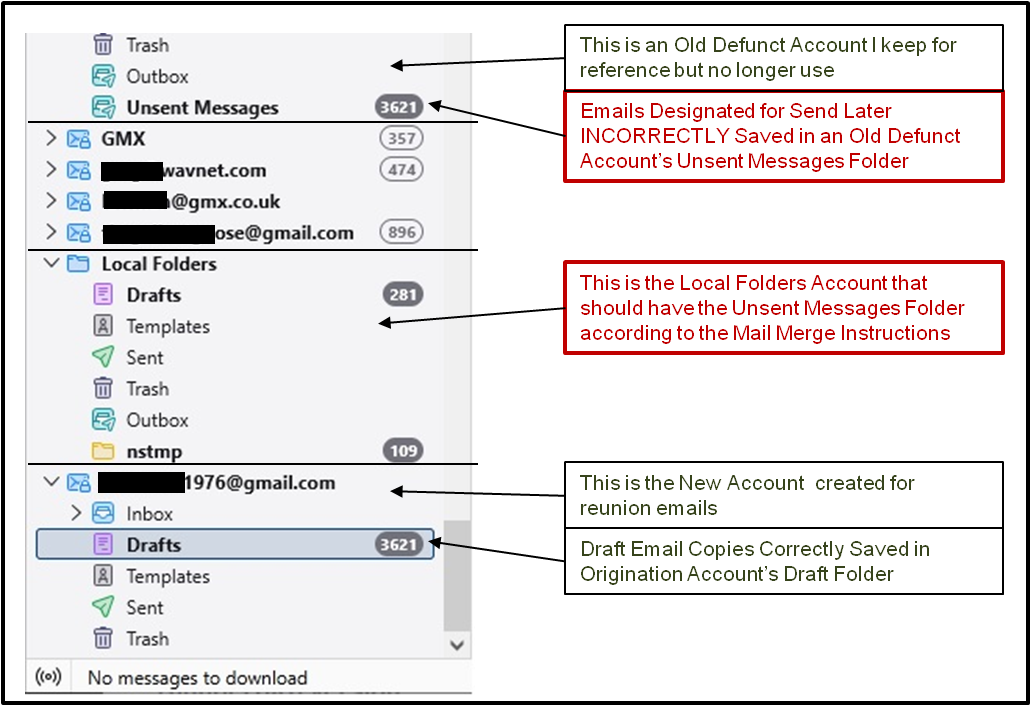
> I have 6 email accounts I manage in my Thunderbird. > Normally I do not delay sending emails, so I have not had a reason to use the Unsent Messages Folder. > I recently installed Thunderbird's Mail Merge Add-On to send mass individual emails to classmates for a school reunion. Doing it this way will allow me to track individual bad emails. I have a total of 3621 emails. > I created a new Gmail Account for this purpose. > There is a concern to not send too many emails out at once to avoid getting flagged and suspended by Gmail as a Spam Account. (Limits of 50 to 500 per 24 hr period have been suggested to avoid this), so scheduling bursts of emails over a period of time is necessary. > The Mail Merge Add-On has 3 output choices, Save as Drafts, Send Later, Send Now. (The instructions warn against using Send Now) > I tried the Save as Drafts function and it performed as promised, creating 3621 individual customized emails in my Account's Draft folder. This, however, makes it so you have to send each email individually. > When I tried the Send Later function, it appeared to work, but a Local Folders > Unsent Messages folder never appeared. I searched all my other email accounts and finally found it in the one Old Defunct email account list that I never use anymore. It does appear to have created all 3621 emails. > I tried to Drag & Drop it into the Local Folders stack, but received an error message that a folder of that name already exists there, even though it does not appear in the list of folders. > I tried repairing folders, compressing folders and was not able to move it or even create a new one of that name and copy the contents. > I would like advice on how to proceed to complete moving/copying the Unsent Messages folder to its proper location in the Local Folders stack. Thank you! greg
All Replies (3)
In 'Local Folders' account there is a folder called 'Outbox' - it is where unsent (Send Later) messages are stored. 'Outbox' is like the opposite of 'Inbox'. Inbox gets new emails coming in and Outbox gets newly composed emails that are ready to go out but not actually sent as yet. Outbox is used by all the accounts.
Please check the following: In 'Account Settings' Select 'Local Folders' On right locate 'Local directory:' It will have some text that points to the 'Local Folders' storage If you use Windows OS it will typically say something like this
- C://Users/username/Appdata/Roaming/Thunderbird/Profiles/profile name/Mail/Local Folders
What does it say in your case ? Make window wide enough to see all the text and post an image of it.
What is that old account at the top? If you have old saved emails in it then I suggest you get copies of all emails into suitably named folders in the 'Local Folders' folder - then when you have checked you can read copied emails - remove the old account via Account Settings.
To move emails from the top account Unsent Messages to Local Folders > Outbox
Try this: select Unsent Messages folder select a batch of emails - right click on highlighted emails and selet 'Copy to' > Local Folders > Outbox.
If this works repeat until all emails are in correct Outbox.