


exe file instead of shortcut on desktop

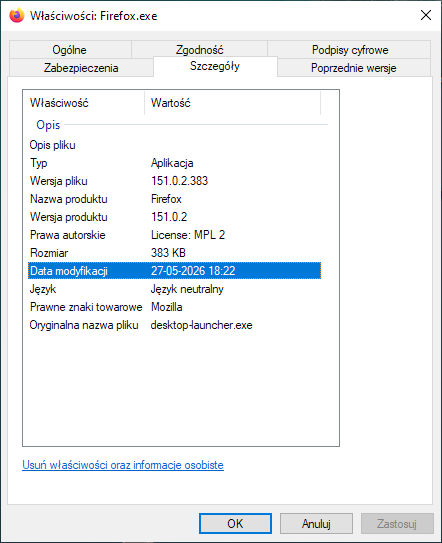
It seems that after the last automatic update of Firefox, the shortcut to launch it, which was previously on the desktop, was removed, and the Firefox.exe file appeared in its place. I've attached the properties of the new file. My antivirus doesn't flag it as malware and I haven't run the specified file before. Is this an update error?
It seems that after the last automatic update of Firefox, the shortcut to launch it, which was previously on the desktop, was removed, and the Firefox.exe file appeared in its place. I've attached the properties of the new file. My antivirus doesn't flag it as malware and I haven't run the specified file before. Is this an update error?
All Replies (1)
This is not a virus.
What to do
- Delete that file from your Desktop.
- Open the Start Menu → search for Firefox → right-click on it → choose Pin to taskbar or Send to → Desktop (create shortcut).
- Alternatively, drag Firefox from the Start Menu to your Desktop while holding the Alt key to create a shortcut.