When I tried to set up my gmail account manually it couldn't verify password and/or username.

Tried to setup gmail account manually. Couldn't verify username and/or password. Thunderbird just opened a window with an URL in plain text and did nothing. Text of window below. https://accounts.google.com/o/oauth2/auth?response_type=code&client_id=406964657835-aq8lmia8j95dhl1a2bvharmfk3t1hgqj.apps.googleusercontent.com&redirect_uri=http%3A%2F%2Flocalhost&scope=https%3A%2F%2Fmail.google.com%2F+https%3A%2F%2Fwww.googleapis.com%2Fauth%2Fcarddav+https%3A%2F%2Fwww.googleapis.com%2Fauth%2Fcalendar&login_hint=daryl_brenton%40wycliffe.org.au
Chosen solution
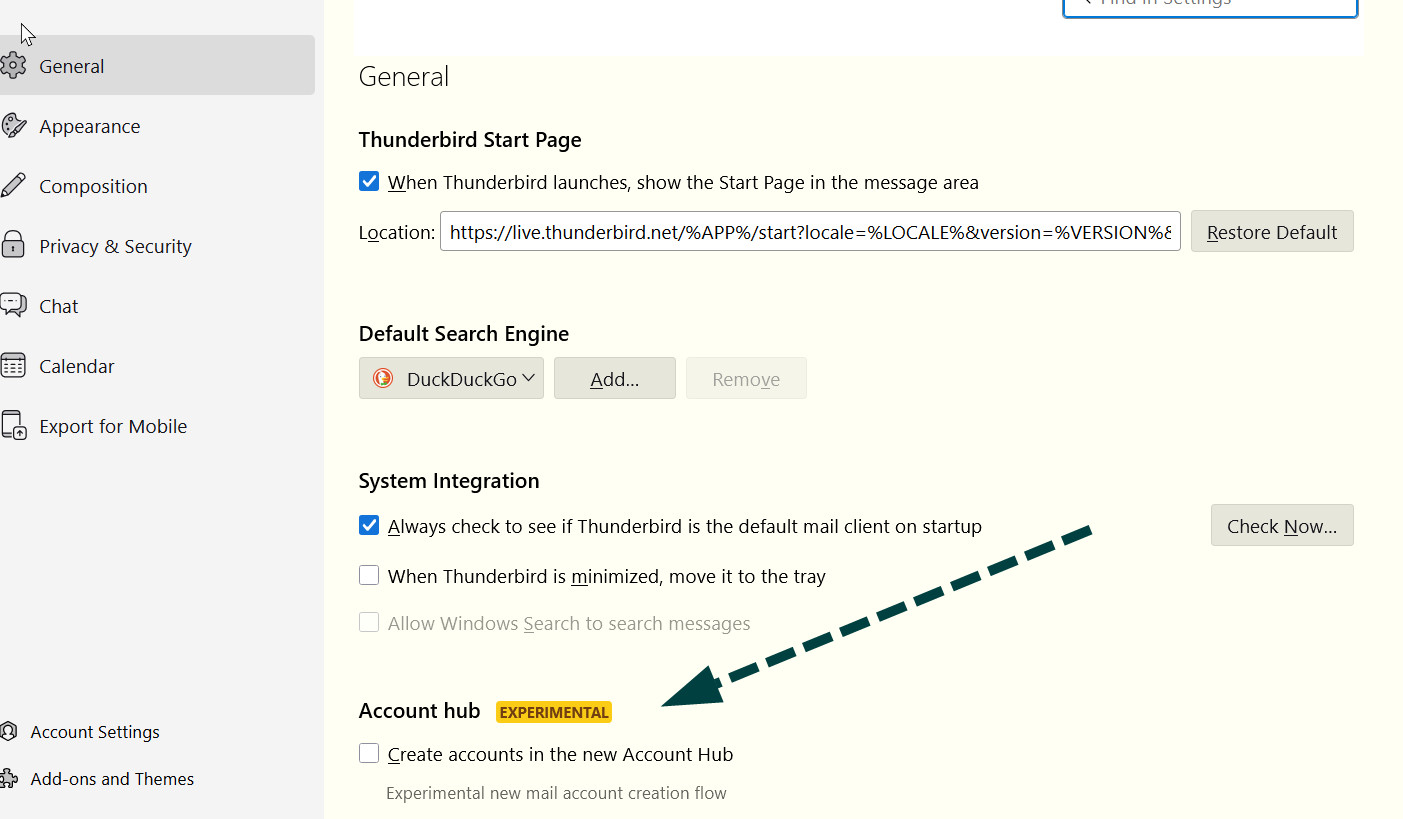
- first, check that thunderbird accepts cookies at 'settings>privacy&security - check that the account hub at settings is UNticked (see attached) - on setup, enter just name and email address. do NOT enter password and wait for the prompt. - that usually works
Read this answer in context 👍 0All Replies (1)
Chosen Solution
- first, check that thunderbird accepts cookies at 'settings>privacy&security - check that the account hub at settings is UNticked (see attached) - on setup, enter just name and email address. do NOT enter password and wait for the prompt. - that usually works