


Thunderbird loses the left margin when I try to forward and/or reply to some messages

I forwarded an email from a different email client to my Thunderbird email client and when I opened that email the left margin was gone. I tried selecting the text and clicking on the right index and nothing happened.
This type thing has happened before when I forward something that comes to my TB account, but usually highlighting the text I add, and clicking on the right index, will move it over a bit.
I would like to know why this is happening, and if I can prevent it or solve it when it does. It looks so unprofessional and sloppy when there is no left margin.
Thanks, NM
All Replies (4)
Your issue is unclear. If messages forwarded from another email client cause a formatting issue, that may be a flaw in the other email client. Seeing a screenshot of message in the original email client and how it formats in Thunderbird may generate ideas.
Thank you David,
What you wrote seems to be true, I tried various emails from different email clients and they all lose most of the left margin, some more than others. The screenshot I took shows the edge of Thunderbird email and my windows background just beyond to the left. The forwarded message is from CAA and it is obviously built in their original email as a table.
I used to use Outlook desktop 2013 but Microsoft stopped supporting it so I then started using Thunderbird as it seems to be very similar. However, I did not experience this problem with the Outlook desktop client.
I can usually select my text in the new forwarded email and move it to the right using the right indent button, but not always, I just don't like sending out unprofessional looking emails.
I searched online but found nothing, so hoping one of you in the community could offer something that could be done to resolve it.
Thanks.
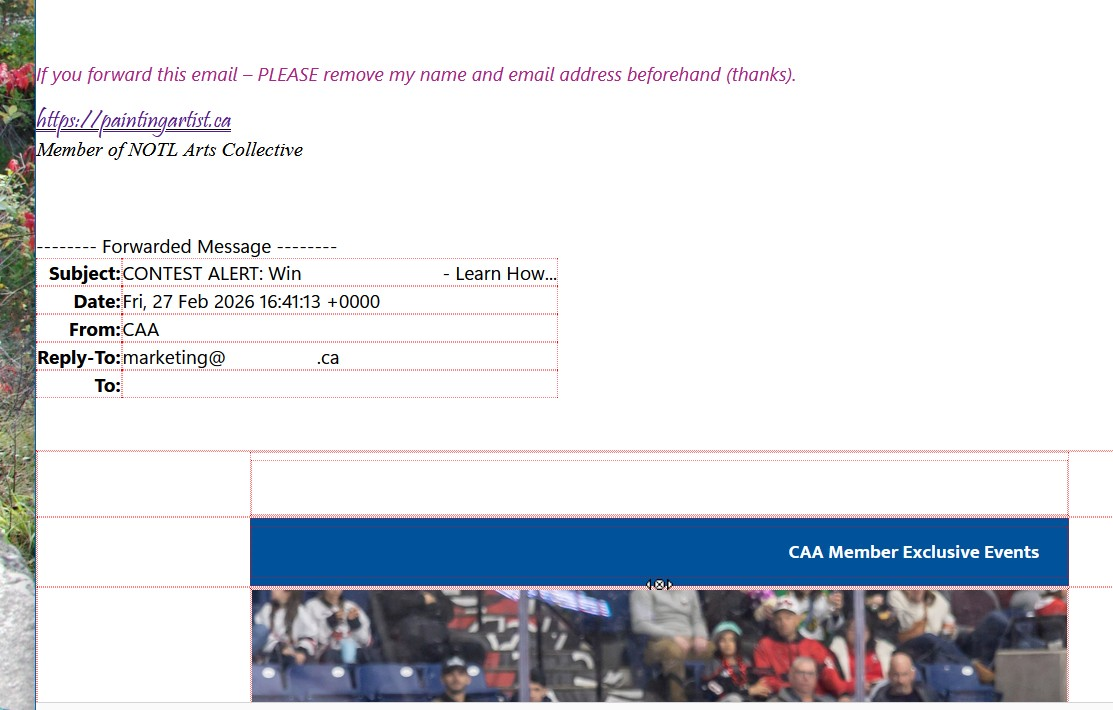
If you received an email from another email client and the message is malformed, fixing it to look proper will generally require that you manually adjust the HTML yourself.
I don't know how to do that in an email. But, thanks for taking the time to respond. I will just have to keep doing what I have been doing. Have a great day.