


I have a black bar at the very top of my Firefox screen and in it are various sites I have searched. Some of them appear to be active as the logo is turning aro

I have a black bar at the very top of my Firefox screen and in it are various sites I have previously searched. Some of them appear to be active as the logo beside them is turning around. I feel this may be slowing down my Firefox. Is it possible to delete this black bar?
Chosen Solution
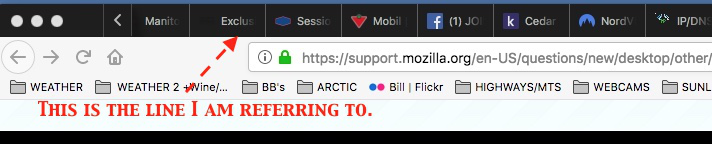
The top bar is the Tabs bar (see attached markup of your screenshot). You can't delete the tabs bar, but if you do not need to keep the pages in those tabs open, you can close those tabs. For example, right-click (or on Mac, Ctrl+click) > Close tab.

All Replies (8)

What happens when you press the three dots at the far left?
Only 3 dots I see are the 3 colored ones. If those are the ones you are referring to please tell me what to do with them. I know the Red is for closing out and the other two have a purpose but I dont think those are the ones you are referring to? Please advise. Thanks.
On the left side of that toolbar.
The 3 that you see in this attached image are the colored ones, except they printed white in the attachment.
Chosen Solution
The top bar is the Tabs bar (see attached markup of your screenshot). You can't delete the tabs bar, but if you do not need to keep the pages in those tabs open, you can close those tabs. For example, right-click (or on Mac, Ctrl+click) > Close tab.
Thanks VERY much jscher2000, I really appreciate your time and effort on this. Just for your info the right click also works on my Mac and likely others. Cheers.
Modified by FFWILLIAM1
Thanks also to cor-el, appreciate your input very much!