


Firefox crashes

All add-ons, extensions, basically everything is disabled and it still crashes
Chosen solution
In that case, try turning off hardware acceleration. Turning off hardware acceleration
Read this answer in context 👍 1All Replies (7)
We're sorry to hear that Firefox is crashing. In order to assist you better, please follow the steps below to provide us crash IDs to help us learn more about your crash.
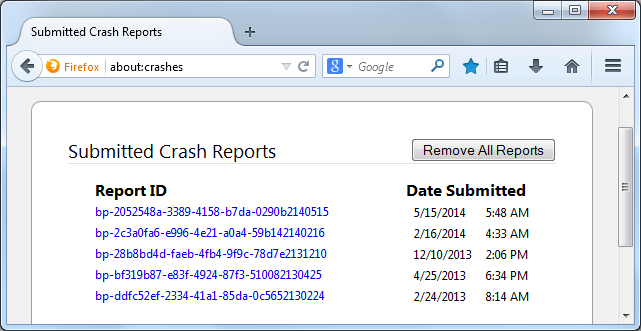
- Enter about:crashes in the Firefox address bar and press Enter. A Submitted Crash Reports list will appear, similar to the one shown below.
- Copy the 5 most recent Report IDs that start with bp- and then go back to your forum question and paste that into the "Post a Reply" box. (Please don't take a screenshot of your crashes, just copy and paste the ID's. The below image is just an example of what your Firefox screen should look like)
 More information and further troubleshooting steps can be found in the Troubleshoot Firefox crashes (closing or quitting unexpectedly) article.

Give us detailed Information on Crash by using Crash report submit,so we can provide you best of support. For that follow these steps :
- Type about:crashes in url bar. A list of Recent crashes will appear .
- Copy the id from that and paste it here with bp-"id..." . format.
You can see the above from by doing this too :
- Type about:support in url bar .
- Under this Crash Reports for the Last 3 Days check and copy the id with above format .
See Crash Report Submission or you want to know reasons of crashes then go for Crash
Hey guys, here are the five most recent crash ID:
bp-872d8482-48dd-40b1-8221-449e32141015 10/15/2014 1:29 PM bp-33fed031-7c7f-4d1d-880d-654c92141015 10/15/2014 1:29 PM bp-8c8ff2a2-38b1-4b2e-b2a6-a9a242141015 10/15/2014 1:27 PM
Looks like an issue with Intel drivers. Check for updated video drivers for the on-board graphics or that video card.
I checked and it said that all drivers were up to date....this is so strange
Chosen Solution
In that case, try turning off hardware acceleration. Turning off hardware acceleration
YES! That worked, awesome, thanks so much for your help!!