


Windows 10 reached EOS (end of support) on October 14, 2025. If you are on Windows 10, see this article.

Mozilla サポートの検索

サポート詐欺に注意してください。 私たちはあなたに通話やショートメッセージの送信、個人情報の共有を求めることはありません。疑わしい行為を見つけたら「迷惑行為を報告」からご報告ください。

詳しく学ぶ

このスレッドはアーカイブに保管されました。 必要であれば新たに質問してください。

strange square box on right side of bookmarks bar

  • 3 件の返信
  • 3 人がこの問題に困っています
  • 162 回表示
  • 最後の返信者: richsusu
  • 解決済み

Dear Mozilla Support

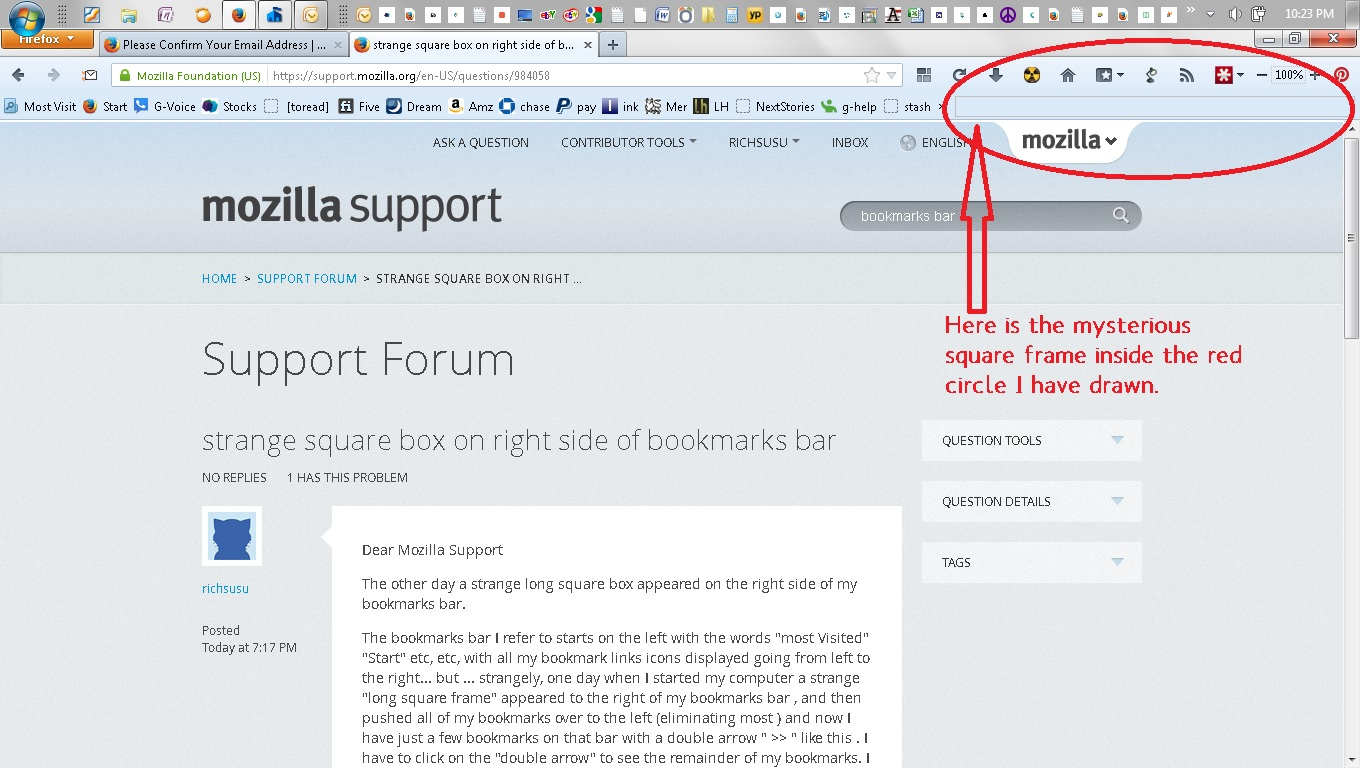
The other day a strange long square box appeared on the right side of my bookmarks bar.

The bookmarks bar I refer to starts on the left with the words "most Visited" "Start" etc, etc, with all my bookmark links icons displayed going from left to the right... but ... strangely, one day when I started my computer a strange "long square frame" appeared to the right of my bookmarks bar , and then pushed all of my bookmarks over to the left (eliminating most ) and now I have just a few bookmarks on that bar with a double arrow " >> " like this . I have to click on the "double arrow" to see the remainder of my bookmarks. I do not wish to have it this way, I would like this "long square frame" removed , so I will finally have "room" for my bookmarks again. By the way, this frame is "Not clickable" nothing happens when you click it, and it is "NOT A SEARCH BOX" it is just a long square frame taking up space on my bookmarks bar. Can someone help. Thankyou in advance ! Rick

Dear Mozilla Support The other day a strange long square box appeared on the right side of my bookmarks bar. The bookmarks bar I refer to starts on the left with the words "most Visited" "Start" etc, etc, with all my bookmark links icons displayed going from left to the right... but ... strangely, one day when I started my computer a strange "long square frame" appeared to the right of my bookmarks bar , and then pushed all of my bookmarks over to the left (eliminating most ) and now I have just a few bookmarks on that bar with a double arrow " >> " like this . I have to click on the "double arrow" to see the remainder of my bookmarks. I do not wish to have it this way, I would like this "long square frame" removed , so I will finally have "room" for my bookmarks again. By the way, this frame is "Not clickable" nothing happens when you click it, and it is "NOT A SEARCH BOX" it is just a long square frame taking up space on my bookmarks bar. Can someone help. Thankyou in advance ! Rick

選ばれた解決策

There have been reports that this is caused by the Zoom Page 9.0 extension.

Start Firefox in Safe Mode to check if one of the extensions (Firefox/Tools > Add-ons > Extensions) or if hardware acceleration is causing the problem (switch to the DEFAULT theme: Firefox/Tools > Add-ons > Appearance).

  • Do NOT click the Reset button on the Safe Mode start window.
この回答をすべて読む 👍 0

すべての返信 (3)

Here is the image of the "mystery square box " I refer to
選ばれた解決策

There have been reports that this is caused by the Zoom Page 9.0 extension.

Start Firefox in Safe Mode to check if one of the extensions (Firefox/Tools > Add-ons > Extensions) or if hardware acceleration is causing the problem (switch to the DEFAULT theme: Firefox/Tools > Add-ons > Appearance).

  • Do NOT click the Reset button on the Safe Mode start window.

Problem Solved ! Thankyou !! When I removed the "Zoom" extension, the mysterious square frame "instantly disappeared"

Thankyou again ! Remarkable, I appreciate your help in clearing up my bookmarks bar, thanks for helping me, your very kind.

Rick