


Windows 10 reached EOS (end of support) on October 14, 2025. If you are on Windows 10, see this article.

Mozilla サポートの検索

サポート詐欺に注意してください。 私たちはあなたに通話やショートメッセージの送信、個人情報の共有を求めることはありません。疑わしい行為を見つけたら「迷惑行為を報告」からご報告ください。

詳しく学ぶ

このスレッドはアーカイブに保管されました。 必要であれば新たに質問してください。

2FA on firefox.com keeps disabling itself

  • 1 件の返信
  • 0 人がこの問題に困っています
  • 171 回表示
  • 最後の返信者: adrien

I've been trying to set up 2fA on my firefox account, the whole process seems to work, I downloaded the backup codes and entered one to confirm and then got confirmation that 2FA was enabled (see screenshot). However, after reloading the page 2fA is shown as being disabled and indeed if I try to log out then in again I'm not asked for a code. I've tried this a couple of times now and it does the same every time. The auth app I'm using is Aegis.

Does anyone knows why this is happening ? Thanks.

[Edit: I just saw that after each time I tried to set it up, in "recent account activity" I add an error saying "Two-step authentication failed" which doesn't really makes sense...]
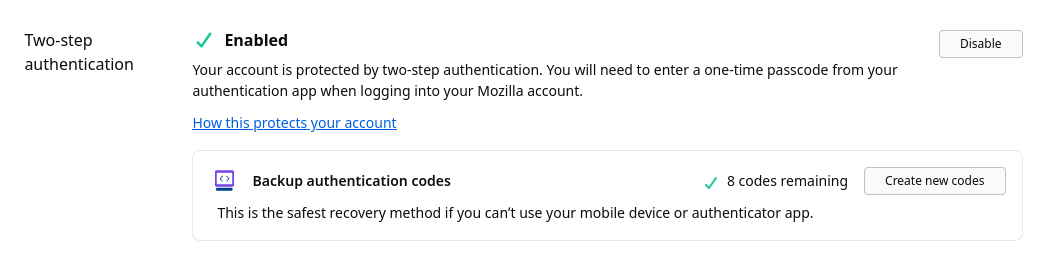
I've been trying to set up 2fA on my firefox account, the whole process seems to work, I downloaded the backup codes and entered one to confirm and then got confirmation that 2FA was enabled (see screenshot). However, after reloading the page 2fA is shown as being disabled and indeed if I try to log out then in again I'm not asked for a code. I've tried this a couple of times now and it does the same every time. The auth app I'm using is Aegis. Does anyone knows why this is happening ? Thanks. [Edit: I just saw that after each time I tried to set it up, in "recent account activity" I add an error saying "Two-step authentication failed" which doesn't really makes sense...]
添付されたスクリーンショット

この投稿は adrien により に変更されました

すべての返信 (1)

I had Firefox running on another computer and this instance was also logged on my account, and it seems it's what was causing these failed login attempts, weird... I logged out on the other computer, re did the 2FA setup and this time it worked....