


Firefox Homepage Configurations reset after login

Every time i setup a new Firefox install and login with my Mozilla account: my homepage configurations reset. I lose all my pinned shortcuts and the related layout settings.
And I doing something wrong? I install, make a few basic config changes in Firefox to match what I want, then I sign in, and poof: i lose my homepage on ALL my active sign-ins.
- Fix Title Type-o: O to o
この投稿は scorc.one により に変更されました
すべての返信 (4)
Pinned tabs are part of the preferences that are synced.
You can set this Sync control pref to false in about:config to exclude pinned tabs from Sync.
- about:config => services.sync.prefs.sync.browser.newtabpage.pinned => false
You can open the about:config page via the location/address bar. On the warning page, click "Accept the Risk and Continue" to open about:config.
Im not sure its the pinned tabs? Firefox > Settings > Home > 'Shortcuts' are what im having issues with. Every new setup wipes what i have (id like them to sync across and be the same everywhere i login).
So, they sync by default; cool: i setup my space on machine 1. Login on a new machine/new install: Boom; all my configs i JUST setup are messed up/gone/reset on that first machine (as well as not being on the new machine).
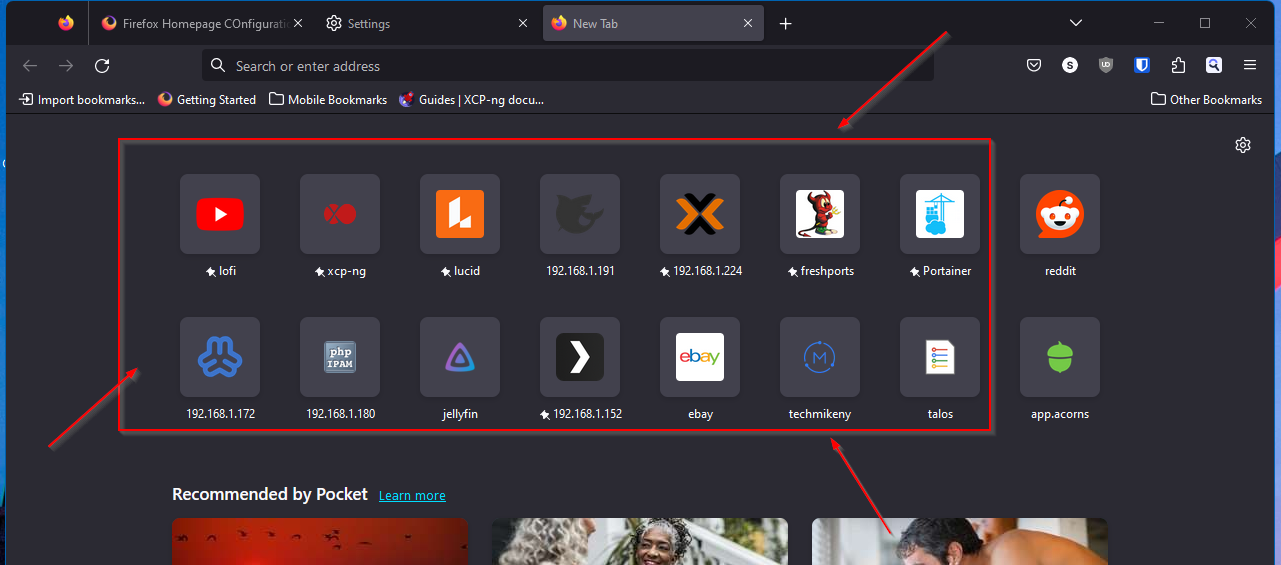
この投稿は scorc.one により に変更されました
Only pinned tiles are synced, other tiles are filled from the history (websites you visited).
Yeah, thats what I am saying here. That is my problem:
Every time i sign into a new machine, i lose all my pinned items on all my old logins. I then have to login to however many machines to set them up again, or to get them to then sync with whatever machine i had JUST re-setup al my pins.
I would think on a browser where i login, they would 'sync down' to that new machine. Instead: the current 'no pins' and the defaults like facebook or w/e, get synced to all my logins.
Seems the complete opposite of what one would want.