


Bookmarks toolbar disappeared after the latest update

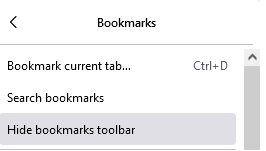
I used to have my Bookmarks toolbar visible. It worked fine until the latest update today. Now it's gone. I've set it to show Bookmarks toolbar. Tried turning it on and off. Doesn't work. Here's a snapshot of it. Just below that last line is a list of my bookmarks on the toolbar. The bookmarks are still there. It's the toolbar that has disappeared.
I used to have my Bookmarks toolbar visible. It worked fine until the latest update today. Now it's gone. I've set it to show Bookmarks toolbar. Tried turning it on and off. Doesn't work. Here's a snapshot of it. Just below that last line is a list of my bookmarks on the toolbar. The bookmarks are still there. It's the toolbar that has disappeared.

すべての返信 (1)
Make sure toolbars like the "Bookmarks Toolbar" are visible. Open the Customize page and set what toolbars (Show/Hide Toolbars) and toolbar items to display.
- Right-click empty toolbar area => Customize
- "3-bar" menu button => More Tols -> Customize
- check that "Bookmarks Toolbar Items" is on the Bookmarks Toolbar
- if "Bookmarks Toolbar Items" is not on the Bookmarks Toolbar, drag it back from the Customize palette to the Customize page to the Bookmarks Toolbar
- if missing items are in the Customize palette, drag them back from the Customize page to the toolbar
- if you do not see an item on a toolbar and in the Customize palette, click Restore Defaults in the Customize palette window to restore the default toolbar set.