


Drop down list of email addresses

This question has to do with logging into web sites with an email and a password. Firefox 101.0.1 (64-bit). Windows 10.
On many sites, when I click in the email field, a drop down list of email addresses appears from which I can make a selection using the mouse or up/down arrow keys. Some web sites have as few as two email addresses in the drop down list, others have many more. I recall that one site has about fifteen email addresses in the drop down list.
How can I remove a non-applicable email address from the drop down list?
How can I clear the drop down list of all email addresses?
Thanks.
選ばれた解決策
Thanks both of you for the advice. I was able to use both Passwords and History to clean up the login email lists.
この回答をすべて読む 👍 0すべての返信 (5)
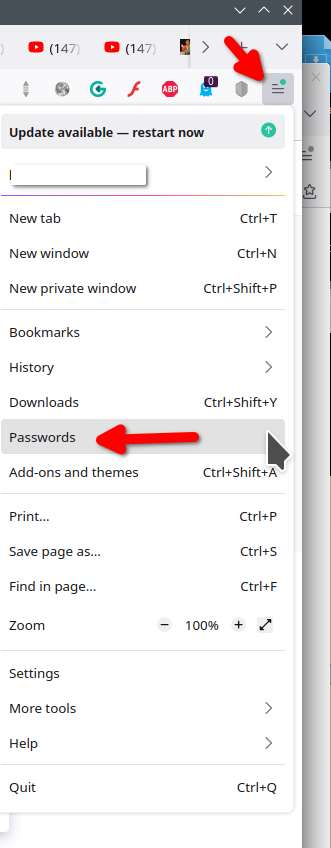
When you go into passwords and search for the site with too many options do you find it? see screenshot
この投稿は jonzn4SUSE により に変更されました
Yes. I find the site that has two email addresses and the site that has a dozen or more email addresses.

You can delete them in Passwords.
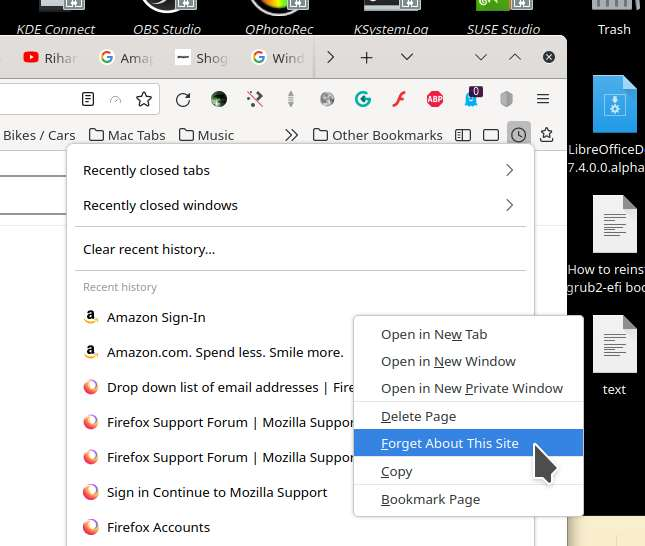
You can also click on site in history and right click for the option to Forget About This Site. see screenshot
この投稿は jonzn4SUSE により に変更されました
選ばれた解決策
Thanks both of you for the advice. I was able to use both Passwords and History to clean up the login email lists.