I hate Lockwise. I do not want it and do not want your passwords.
I really like firefox but have to shut it down to add a new password if I don't use one of yours which are too long and complicated. And I don't think you need to have my passwords. Typical firefox password:
4ut693zdfcp049stev5dd679*. To long and too complicated. And does not give me choice to make my own. It is like a rabid pitbull.
No thanks. I understand this dreadful thing is imbedded? How can I get it to go away? Susan Taylor
この投稿は cor-el により に変更されました
選ばれた解決策
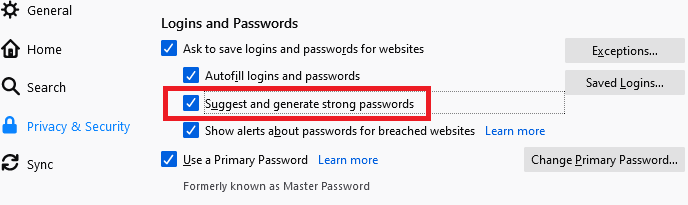
Did you try unchecking this box:

If you do not want to use Lockwise (the built-in password manager) at all, uncheck the top-level box labeled "Ask to save logins and passwords for websites". See: Password Manager - Remember, delete and edit logins and passwords in Firefox.
この回答をすべて読む 👍 0すべての返信 (3)

Mozilla is now asking for something called a 'passphrase' in preference to a password. I was able to choose to enter an old style password on a Mozilla site but had to check its requirements, one of which is that the password must comprise 12 characters (!). The requirements don't affect websites other than Mozilla.
Is this about the Firefox feature to generate passwords ?
選ばれた解決策
Did you try unchecking this box:
If you do not want to use Lockwise (the built-in password manager) at all, uncheck the top-level box labeled "Ask to save logins and passwords for websites". See: Password Manager - Remember, delete and edit logins and passwords in Firefox.