How To Remove Empty Overflow Menu When Using Bookmarks Sidebar

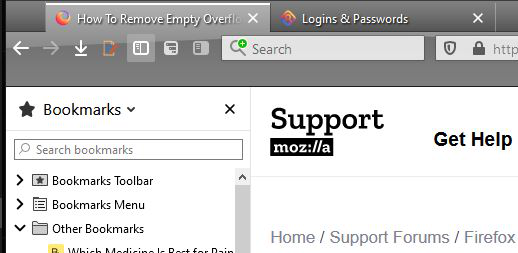
I'm trying to get a more compact menu area to increase vertical page viewing area. No need for the overflow menu, so just taking up screen space. Thanks
I'm trying to get a more compact menu area to increase vertical page viewing area.
No need for the overflow menu, so just taking up screen space.
Thanks
選ばれた解決策
It that about the empty Bookmarks Toolbar that takes this space below the Navigation Toolbar ?
Do you want to use the Bookmarks sidebar instead of the Bookmarks Toolbar ?
この回答をすべて読む 👍 1すべての返信 (4)
Added pic.

この投稿は ggg3 により に変更されました

Hi, what firefox version is using?
選ばれた解決策
It that about the empty Bookmarks Toolbar that takes this space below the Navigation Toolbar ?
Do you want to use the Bookmarks sidebar instead of the Bookmarks Toolbar ?
THANKS, that was the Bookmarks Toolbar :-). Changed to Never Show and the sidebar is still there!