


When printing bank statement part of document is completely blacked out
I have a problem printing my bank statement using Mozilla Firefox. Portions of the statement (in a table format) are completely blacked out. Other portions of the statement which are also in a table format print tine. I do not have the problem when using Microsoft Edge (same desktop) or Safari (iPad) and I am using the same printer for all three browsers. The statement utilizes Acrobat Reader so I first uninstalled and then reinstalled Acrobat Reader. The problem persisted. Clearly, the problem is with Mozilla Firefox. I have taken all the steps suggested in "Fix printing problems in Firefox" to no avail. This included resetting all Firefox printer settings. Since it is my bank statement I cannot send you a copy of the printout. However, I will say that the Mozilla Firefox print preview does not show any portion of the document being blacked out - it only occurs upon printing and only when using Mozilla Firefox.
すべての返信 (2)
選ばれた解決策
We don't want you to share your bank statement.
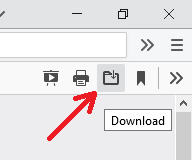
As a workaround, please use the download button on Firefox's PDF viewer to launch the PDF into Acrobat/Reader for printing. (I do this whenever the built-in viewer doesn't do a good job.) That button appears on the viewer's toolbar:

Thank you. The workaround was a success. I will try to remember to do this in the future; but, I still don't understand why the initial problem ONLY occurred in Mozilla Firefox.