

このスレッドはアーカイブに保管されました。
必要であれば新たに質問してください。

Solved
アーカイブに保管済み
Facebook container
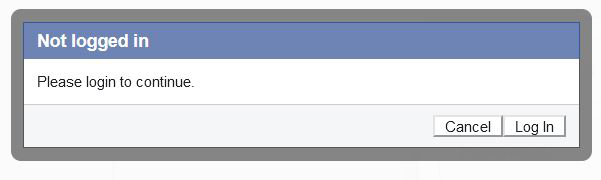
I have been using the Facebook container without any problem for some time. Today I refreshed Firefox as I was told it may solve another issue. Since then, whenever i try to log in to Facebook with the container enabled I continually get the dialog box shown in hte attached. Whenever I click Login or Cancel, the Facebook login page appears briefly but is then replaced with this dialog box. If I disable the addon and reload Firefox I can log in to Facebook OK. I only have one other addon enabled, McAfee Web Advisor. I have been using this for some time as well without any issues. I'm using Firefox82.0.3 (64-bit) on Windows 10 and the Facebook container is version 2.1.2
I have been using the Facebook container without any problem for some time. Today I refreshed Firefox as I was told it may solve another issue. Since then, whenever i try to log in to Facebook with the container enabled I continually get the dialog box shown in hte attached. Whenever I click Login or Cancel, the Facebook login page appears briefly but is then replaced with this dialog box. If I disable the addon and reload Firefox I can log in to Facebook OK. I only have one other addon enabled, McAfee Web Advisor. I have been using this for some time as well without any issues. I'm using Firefox82.0.3 (64-bit) on Windows 10 and the Facebook container is version 2.1.2
すべての返信 (1)
選ばれた解決策
Did another refresh and it seems OK now